




Livin' Katalog Lelang
Katalog Lelang
How to View Catalogs & Information on Livin' Lelang
Access a wide range of Bank Mandiri auction assets by type, location, and price directly on Livin' by Mandiri. Explore now and secure your assets at competitive prices!
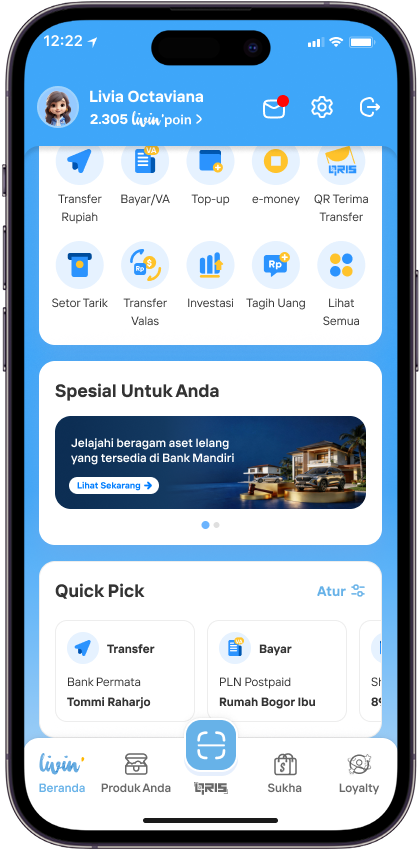
To view the catalog, tap the banner on the Home page.
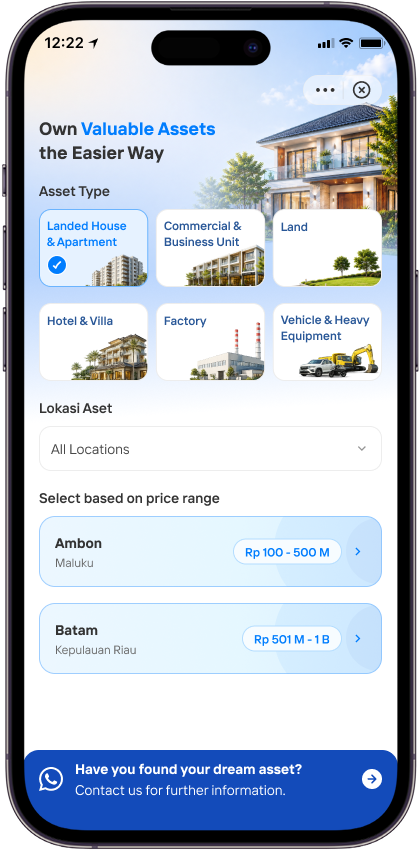
Select the type of property you’re looking for, then choose a location to view a range of prices. If you’ve found the property you’re looking for or need further information, tap the WhatsApp logo below
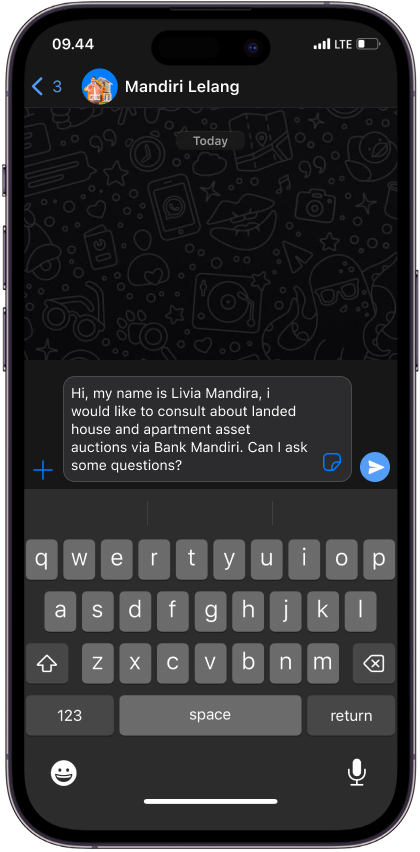
Send a message to get in touch with staff Mandiri Lelang
FAQ - KATALOG LELANGZ
Frequently Asked Questions
What is meant by Livin Katalog Lelang?
A feature in Livin' that helps customers view the list of auction assets available from the Bank Mandiri catalog and connects customers with the Mandiri Lelang communication channel if they are interested in participating in an auction.
What are the requirements for me to view assets in Livin Katalog Lelang?
Customers who wish to view the auction catalog must:
- Install the latest version of Livin' (make sure to update from Playstore/Appstore)
- Get the Livin' Lelang promo banner on the Livin' homescreen
- The Livin' Lelang promo banner will be gradually opened to all Livin' by Mandiri customers
What are the benefits of Livin Katalog Lelang?
Through this feature, customers can:
- Browse the auction asset catalog by asset type (Residential House, Land, Vehicles, and others)
- Filter results based on city/regency location where auction assets are available
- Open and read PDF catalog files directly within the app
- Connect with the bank's auction team via WhatsApp if interested in participating
Note: The Livin' Lelang feature is for browsing and viewing the catalog. The auction participation process is done outside the app through the Bank Mandiri auction team.
What types of assets can I find in Livin Katalog Lelang?
Customers can find the following 6 asset categories:
- Residential House & Apartment
- Commercial Space & Ruko
- Hotel & Villa
- Land
- Factory
- Vehicles & Heavy Equipment
How do I view the Auction Catalog in Livin'?
- Click the Livin' Lelang Promo Banner on the Homescreen
- Select the desired asset type on the Livin' Lelang Landing Page
- Click the Asset Location Filter to select a specific City/Regency
- Select the catalog to view based on the available price range
- Scroll through the Asset Catalog to find the desired auction asset
What should I do if I am interested in an asset from the auction catalog?
- Select the desired Asset Location and click the Banner at the bottom of the page
- The customer will be directed to the Mandiri Lelang WhatsApp chat with a pre-filled template to express interest in the auction.
The customer will be directly assisted by the Mandiri Lelang PIC via WhatsApp according to the message queue within the same day's SLA to proceed with the next steps for auction submission.
Where are the asset locations available in Livin Katalog Lelang?
Customers can display assets from various cities and regencies throughout Indonesia by following these steps:
- Open the Auction Catalog feature via the Promo Banner on the Livin' Homescreen
- Select the desired asset category (e.g., Residential House & Apartment)
- Tap the location filter button below the category
- Select a province to see the available cities/regencies within it, or use the search column to find a city directly
Why does the city/regency I want not appear in Livin Katalog Lelang?
The desired city or regency does not appear because there is no active catalog available for that location. Please select another city or regency that has an active catalog according to the chosen category.
Why does the Livin Katalog Lelang button fail to display?
- Unstable internet connection: Make sure your internet connection is stable when opening the auction catalog in Livin' so that the catalog can be downloaded.
- Outdated Livin' app version: Make sure to update the Livin' by Mandiri application to the latest version on Playstore/Appstore.
What should I do if the WhatsApp contact page in Livin Katalog Lelang fails to display?
- WhatsApp application not installed: Install the WhatsApp application first via Playstore/Appstore, then try clicking "Interested in joining the auction" again to be redirected to chat with Mandiri Lelang WhatsApp. Alternatively, contact Mandiri Lelang directly at +62 821-7117-1172.
- Unstable internet connection: Make sure your internet connection is stable when trying to open the WhatsApp contact page in Livin Katalog Lelang.
What should I do if my WhatsApp contact for Livin Katalog Lelang has not received a response?
The Mandiri Lelang contact is available during business days and hours. If the customer has not been replied to by the relevant team, please wait approximately 1 business day and try contacting again.
Where can I get more information about the Mandiri Lelang program?
Customers can access https://lelang.bankmandiri.co.id/ to see program details and view details of each asset being auctioned.