



Livin’ Call by Mandiri
R22 - Mandiri 14000
Ready to Help Your Needs Better with Livin' Call
Send report, block card, or connect toll-free and directly with our agents.
We areready to assist you 24/7, wherever you are, whether in Indonesia or abroad.
Report Transaction Issues
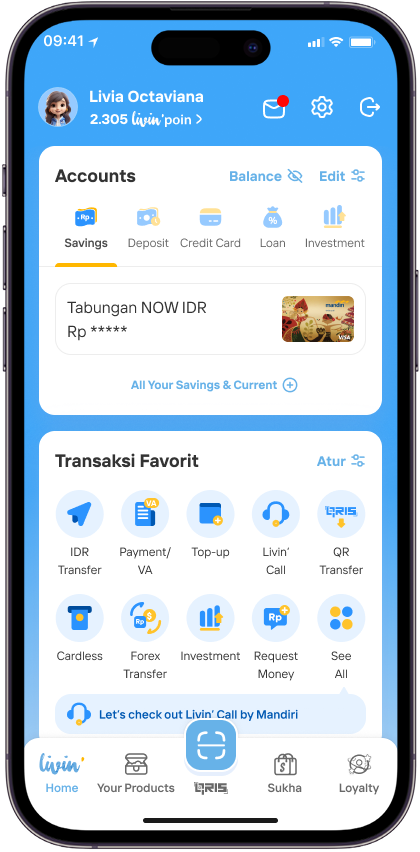
Login to Livin’ and open Livin' Call in Home, or you can also access it via Settings
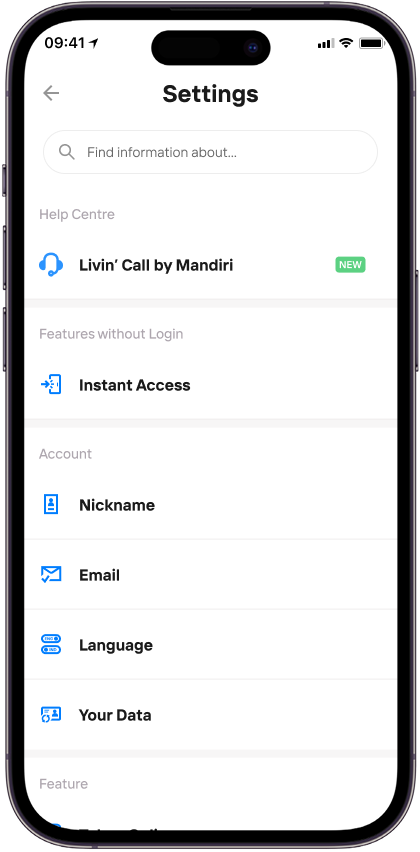
Choose Livin' Call by Mandiri
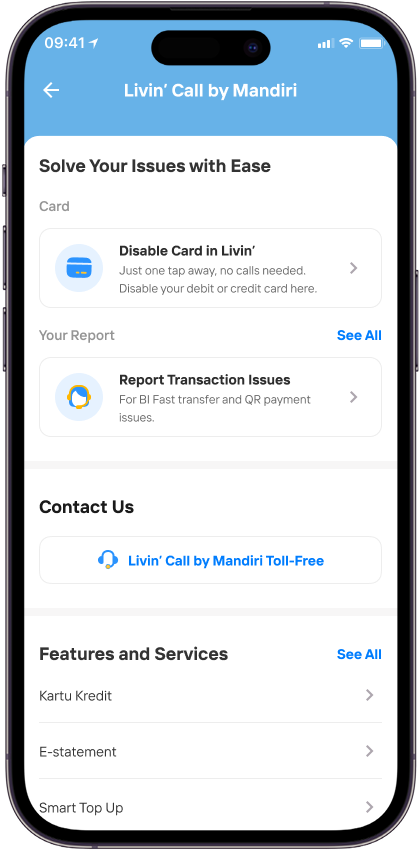
Click Report Transaction Issues
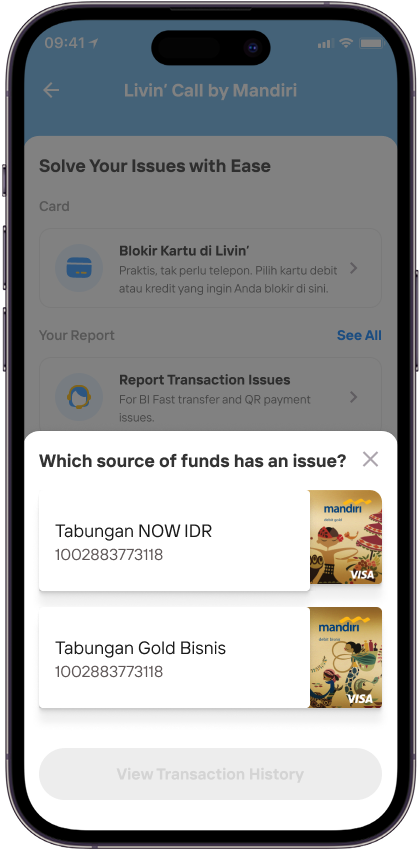
Choose the source of fund of your transaction
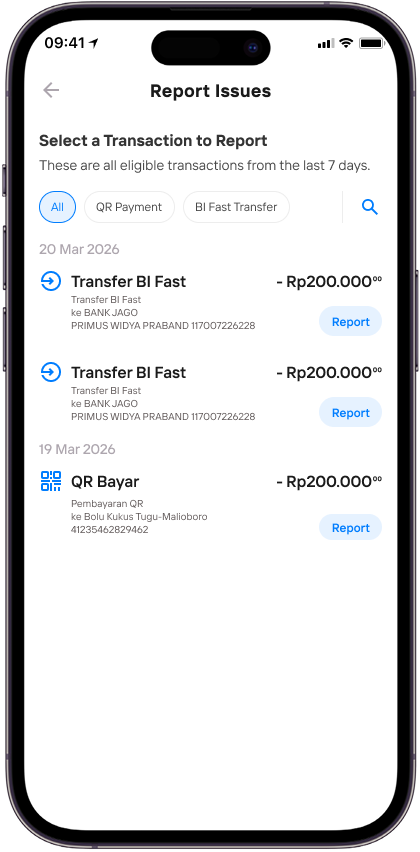
Choose the transaction you want to report. Available for QR Payment and BI Fast Transfer
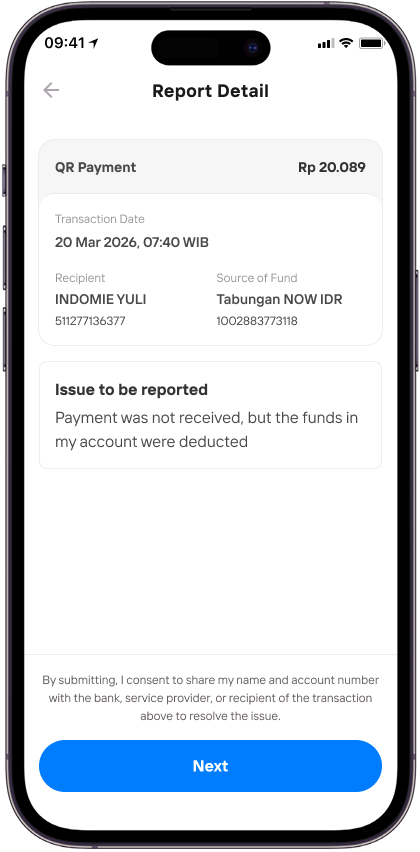
For QR Payment issues, double check the transaction details
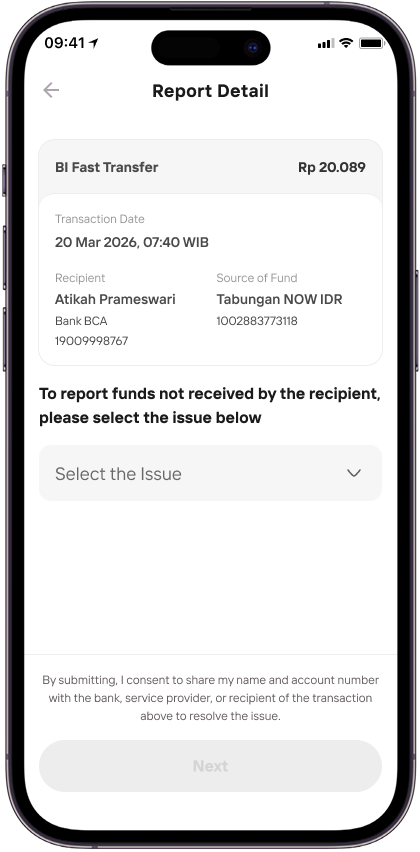
For BI Fast Transfer issues, select the issues based on your condition
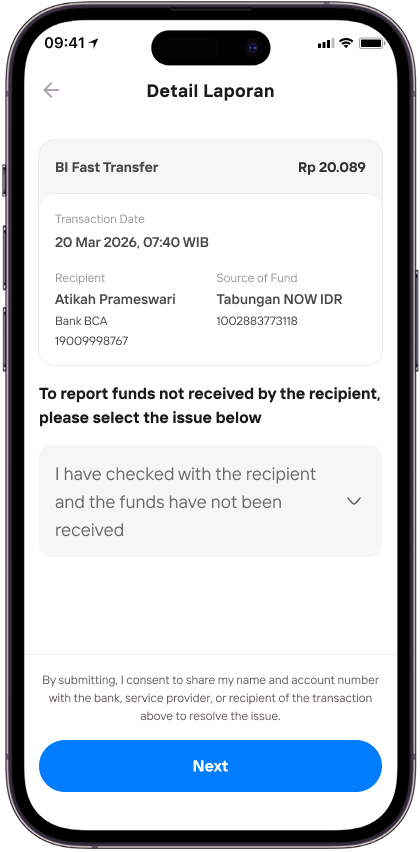
For BI Fast Transfer issues, select the issues based on your condition
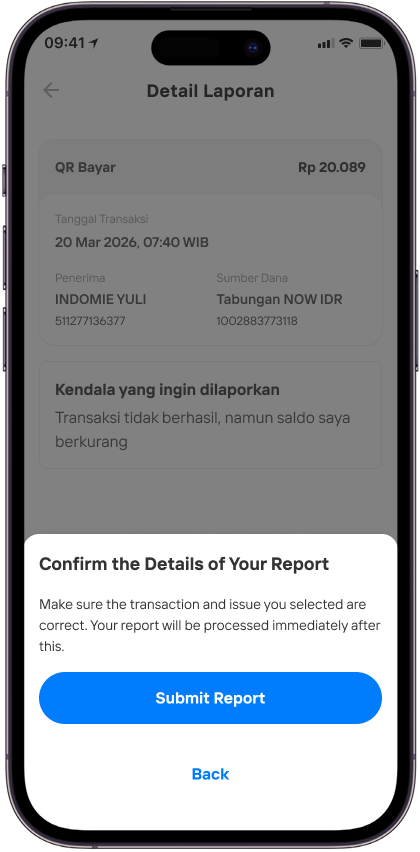
Ensure all the details are correct, then click Submit Report
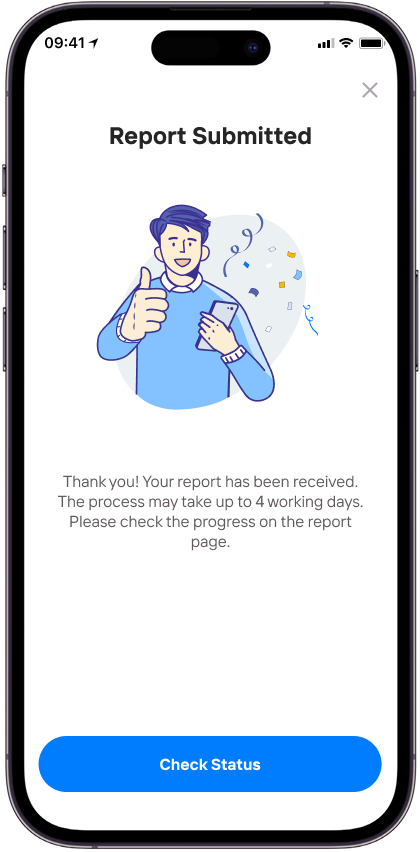
Report sent and we’ll be working on it right away
Contact Livin' Call by Mandiri Toll-Free
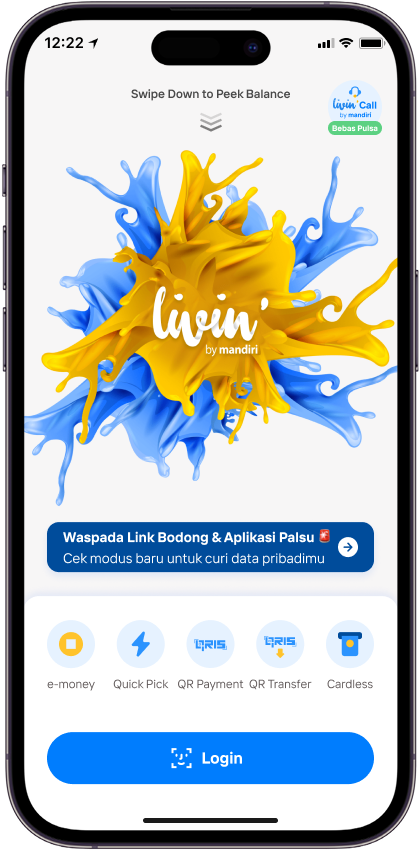
Access the Toll-Free Livin' Call feature before login, by tapping the Livin' Call Toll-Free menu at the top right corner.
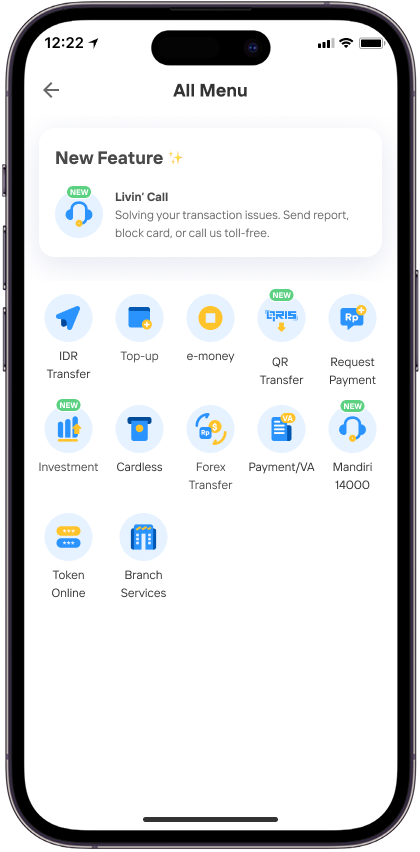
To access from the Home screen, tap See All in the Favorite Transactions section, then select Livin' Call
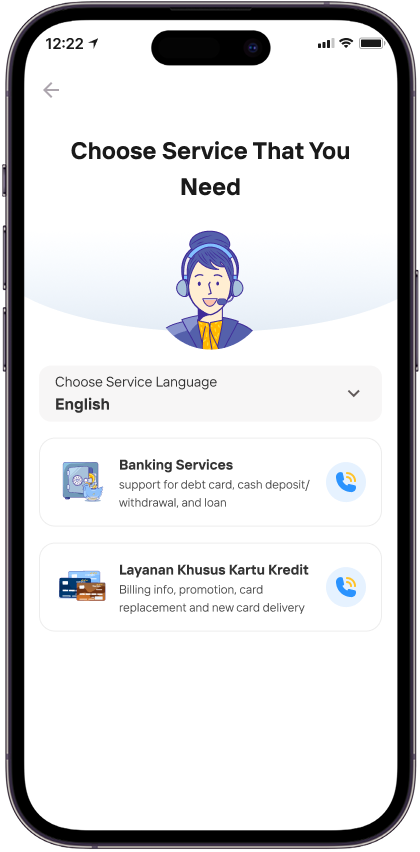
Before being connected to our staff, you can select your preferred language and the type of service you need.
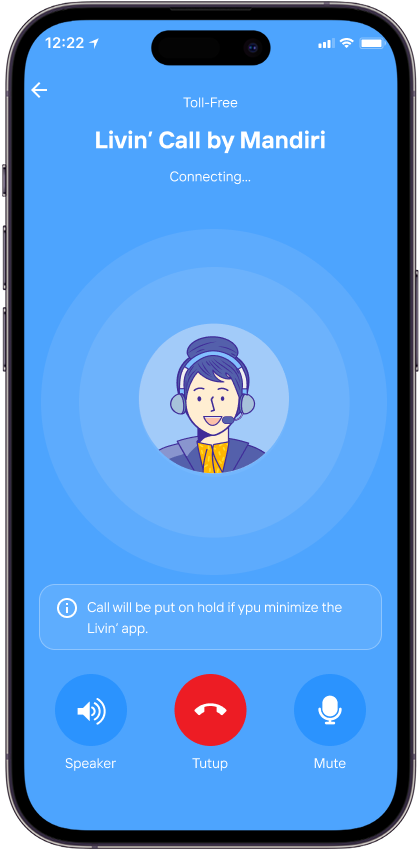
While using this service, please ensure the Livin' by Mandiri app remains open to avoid connection issues.
R22 RISKS COSTS LIVIN CALL
1. To avoid failure when making a Livin'Call by Mandiri free credit call, before making a call via Livin'Call by Mandiri, ensure that:
- You are using the latest version of the Livin' by Mandiri app
- You have an active account and are logged in to the Livin' by Mandiri app
- You have a stable internet connection, whether using a mobile network or Wi-Fi
- You have granted permission to the Livin' by Mandiri app to access the microphone
2. In Livin'Call by Mandiri free-call calls, you are not charged mobile call fees.
R22 - FAQ - VOIP
Frequently Asked Questions
What is Livin' Call by Mandiri – Report Transaction Issues?
Livin' Call by Mandiri – Report Transaction Issues is a feature in the Livin' by Mandiri application to make it easier for Customers to submit reports or transaction problems experienced, as well as check the status of the report.
What transactions can be reported through Livin' Call by Mandiri – Report Transaction Issues?
Currently, transactions that can be reported through Livin' Call by Mandiri – Report Transaction Issues are BI-Fast Transfer Transactions and QR Payments made through the Livin' by Mandiri application and meet the requirements to be reported.
Can I create more than one report?
Yes, Customers can make 2* new complaints per day and 10* reports per type of transaction with status in process. If the maximum complaint is exceeded, the Customer cannot make a new report. (*subject to change at any time according to bank regulations)
Can I immediately submit a complaint report?
For complaints about QR Payment transactions, Customers can directly submit complaints on transactions that have a pending or pending status. Meanwhile, for BI-Fast transaction complaints, customers need to wait 30* minutes from the transaction time first to be able to submit complaints at Livin' Call by Mandiri – Report Transaction Issues. (*subject to change at any time according to bank regulations)
How long can I make a complaint report on Livin' Call by Mandiri – Report Transaction Issues?
Customers can make a complaint report to Livin' Call by Mandiri – Report Transaction Issues for transactions that occurred within the last 7* days. (*subject to change at any time according to bank regulations)
Where can I find out the processing time for the completion of my complaint report?
The Customer can find out the time for the report completion process on the Successfully Submitted Report page after the Customer makes a complaint, as well as on the Details page of your Report.
How do I know if my complaint report has been answered?
Customers can view the status of complaint resolution on your Report Details page. Customers will also receive notifications (email and push notifications) if the report has been processed or the report has exceeded the promised completion time.
Can I cancel a complaint report that has already been made?
No, the Customer cannot cancel the complaint report that has been submitted on the Livin' Call by Mandiri – Report Transaction Issues menu. Cancellation of complaint reports can be done through Livin' Call by Mandiri Toll-Free, Mandiri Call Livin' Call by Mandiri, or the nearest branch by mentioning the ticket number listed in Livin' Call by Mandiri – Report Transaction Issues.
What is the Livin' Call by Mandiri Toll-Free Livin' by Mandiri feature?
The Livin' Call by Mandiri Toll-Free Feature is a Voice-Over Internet Protocol-based toll-free calling service feature using the Internet/Wi-Fi network in the Livin' by Mandiri application which allows customers to communicate directly with Mandiri Call Center Agents regarding banking information, credit cards and complaints about transaction problems, making it more practical without using credit.
Can all customers use the Livin' Call by Mandiri Toll-Free feature at Livin' by Mandiri?
Yes, this feature can be used by all customers at home or abroad as long as they have a stable internet connection and log in with an active account on the Livin' by Mandiri application.
Is Livin' Call by Mandiri Toll-Free service available 24 Hours?
Yes, the Livin' Call by Mandiri Toll-Free service to connect to Bank Mandiri Call Center agents is available 24 hours every day (24/7).
What are the benefits I get when filing a complaint through the Livin' Call by Mandiri Toll-Free feature?
The benefits obtained by the Customer when filing a complaint through the Livin' Call by Mandiri Toll-Free feature are as follows:
- No credit fees
- More practically, customers only need to select the Banking or Credit Card menu, then Livin' Call by Mandiri Toll-Free calls will be automatically directed to the appropriate agent.
How long can I make a Livin' Call by Mandiri Toll-Free call?
There is no limit to the maximum duration of Livin' Call by Mandiri Toll-Free calls. Calls can take place as long as the handling process is still running and the internet connection is stable. If the service/system timeout is exceeded under certain conditions, the call may end automatically.
Will I be able to access Livin' when a Livin' Call by Mandiri Toll-Free call is in progress?
Yes, customers can still access Livin' when Livin' Call by Mandiri Toll-Free calls take place. However, some menus/features cannot be accessed during active calls, such as Sukha, Logout of sessions in the Livin by Mandiri application, and several other features.
What can cause Livin' Call by Mandiri Toll-Free to be disconnected?
Livin' Call by Mandiri Toll-Free can be disconnected if:
- Customer forcibly closes the app (kill app)
- An interrupted/disconnected internet connection (e.g. weak signal, network switching, or unstable Wi-Fi).
Can I open other applications by minimizing Livin' during Livin' Call by Mandiri Toll-Free calls?
Yes, customers can move to other applications. However, when minimizing Livin', the call can be paused so that the agent/customer service cannot hear the Customer's voice for a while, until the Customer returns to the Livin' application.
Can Livin' Call by Mandiri Toll-Free be used with a headset/Bluetooth?
Yes, customers can use a headset or Bluetooth device when calling Livin' Call by Mandiri Toll-Free. If the device is connected to your phone and the audio/microphone settings are active correctly, you can use your headset/bluetooth.
What should I do if my Livin' Call by Mandiri Toll-Free call is not connected to the Mandiri Call Center Agent?
If Livin' Call by Mandiri Toll-Free calls are not connected, you can perform the following steps:
- Check the internet connection, make sure your WiFi or mobile data network is stable and has a strong signal.
- Retry the call, close the call feature and try again a few moments later.
- Update the version of the Livin' application, make sure the Livin' by Mandiri application is up to date.
- Check operating hours, although the service is available 24/7. During periods of high traffic you may experience queues, wait a while until an agent is available.
- Use other alternatives, If the problem persists, contact Mandiri Call Center via regular phone at 14000 (tariff conditions apply).