




Consumer Present Token Secure
CPTS - Content
How to Pay for Online Purchases with a CPTS Online Token
Make payments at online merchants or e-commerce platforms using a Virtual Card Number (VCN) and One-Time Token (OTT). Follow the guide below.
CPTS Payment
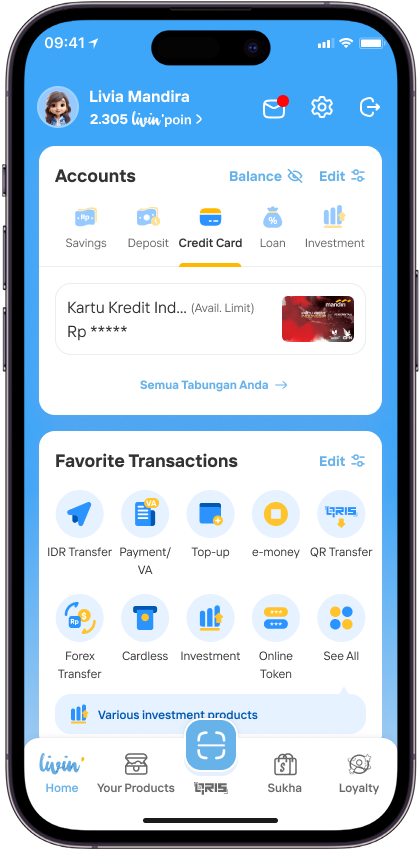
Open the Livin’ app, then select the Token Online menu on the Home page to start the transaction process.
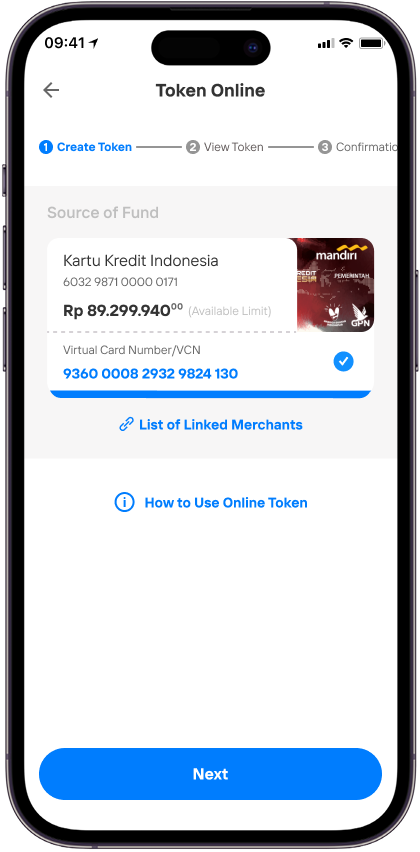
Select the source of funds to be used as the payment method, then click Continue to obtain your transaction token.
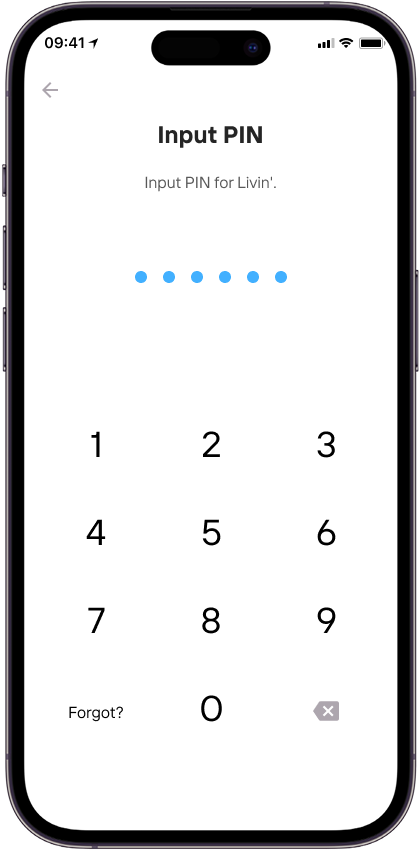
Enter your Livin’ PIN for the verification process.
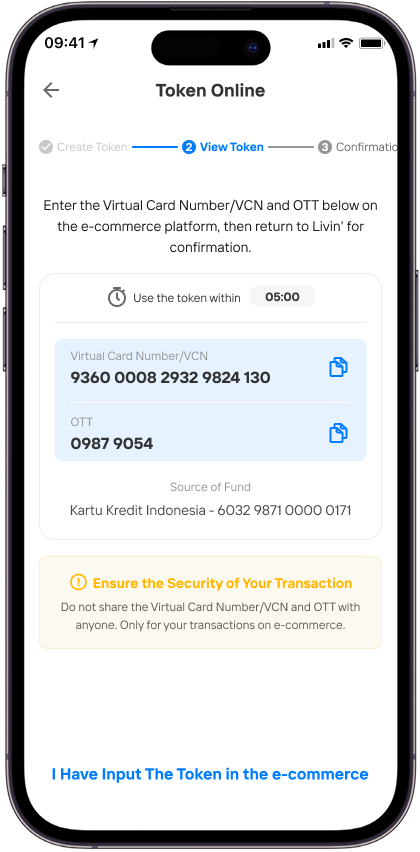
Copy the VCN and OTT codes that appear, then enter or paste them into the payment page of the destination merchant.
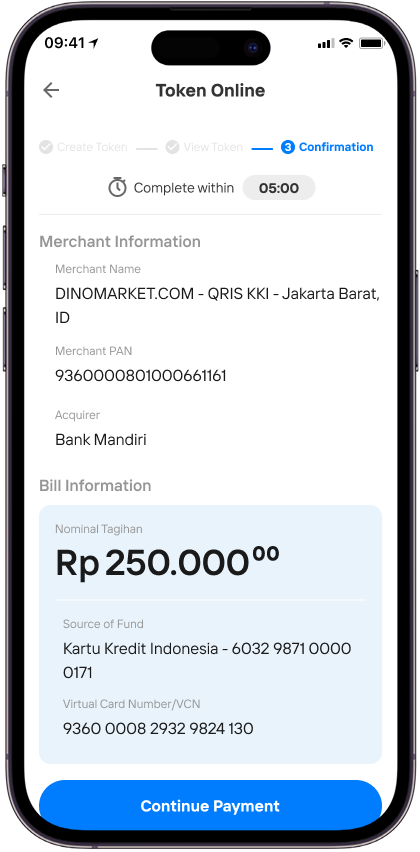
Double-check your transaction details, then confirm the payment to proceed within 5 minutes.
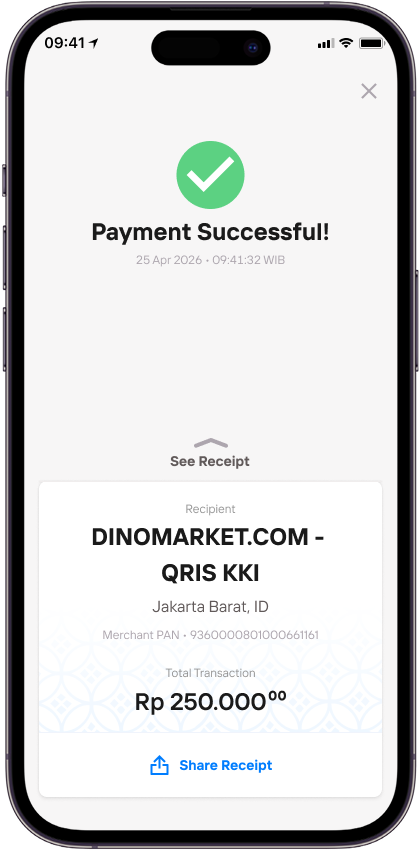
Once the process is successful, your payment will be confirmed and the transaction will be completed.
CPTS Payment + Binding Request
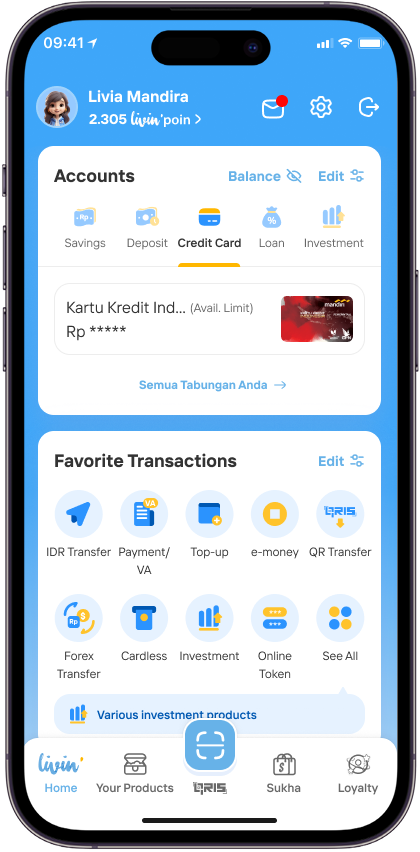
Open the Livin’ app, then select the Token Online menu on the Home page to start the transaction process.
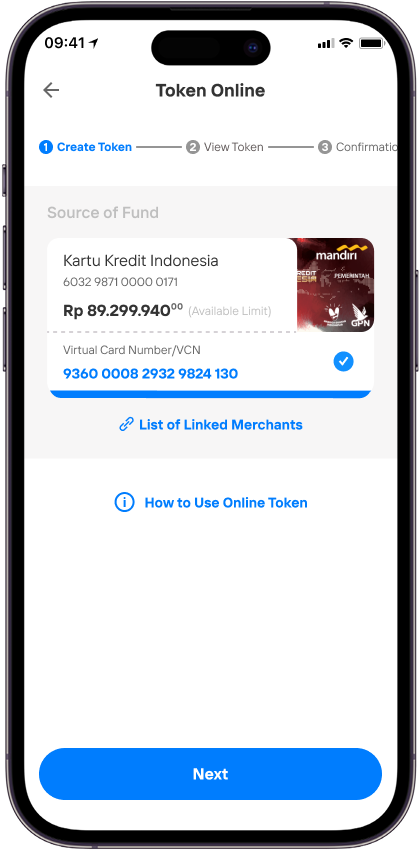
Select the source of funds to be used as the payment method, then click Continue to obtain your transaction token.
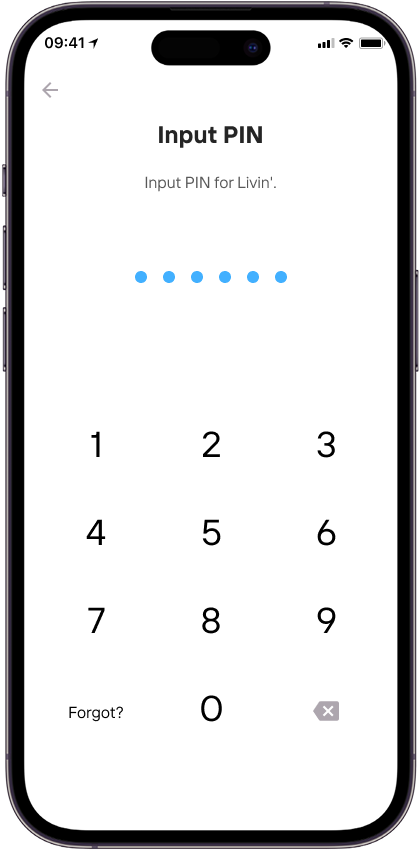
Enter your Livin’ PIN for the verification process.
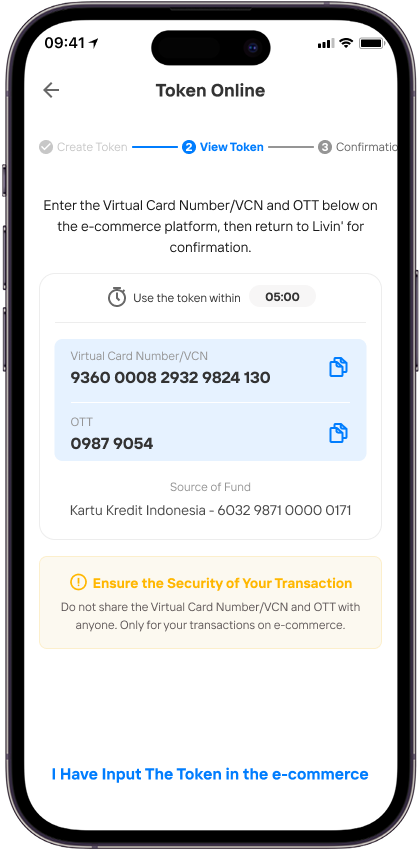
Copy the VCN and OTT codes that appear, then enter or paste them into the payment page of the destination merchant.
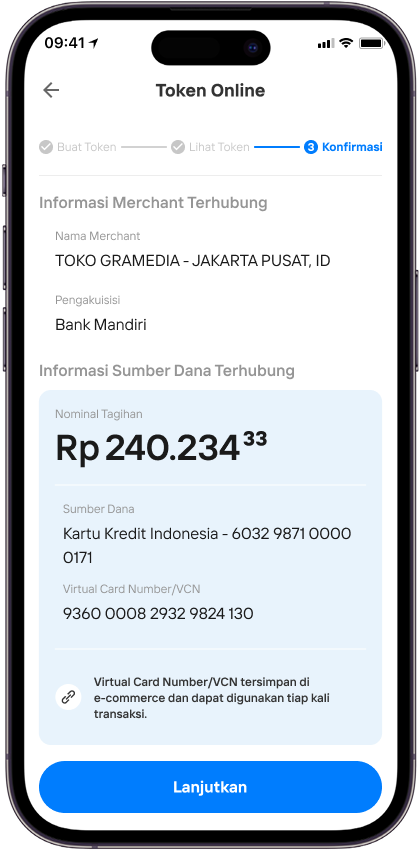
Please check your transaction details again, then confirm the payment and complete the account linking process within 5 minutes.
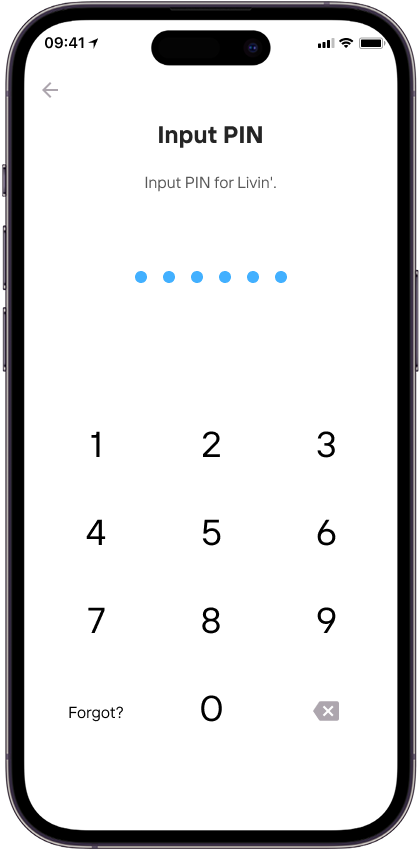
Enter your Livin’ PIN for the verification process.
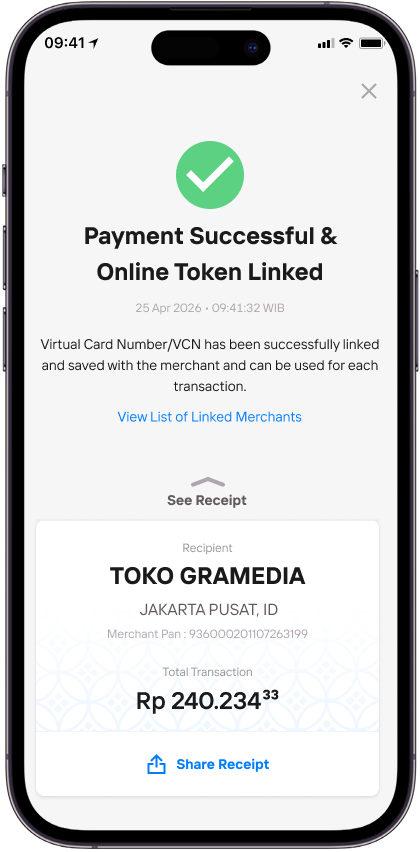
Once the process is successful, your payment will be confirmed and the transaction will be completed..
Binding CPTS Payment with Confirmation
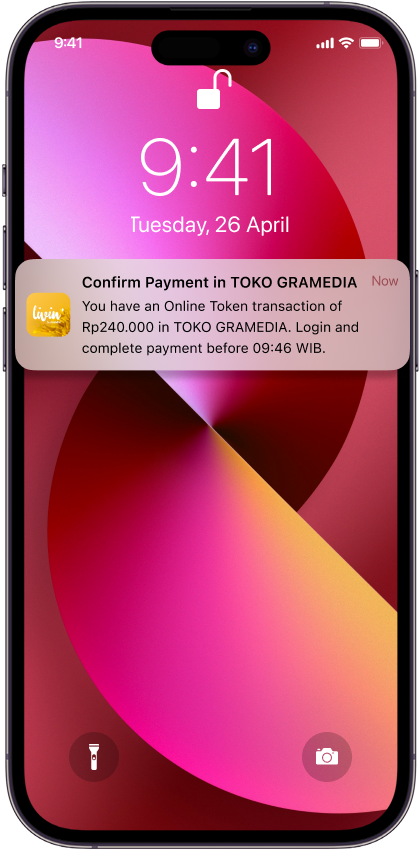
Click the notification to see the payment details in Livin’.
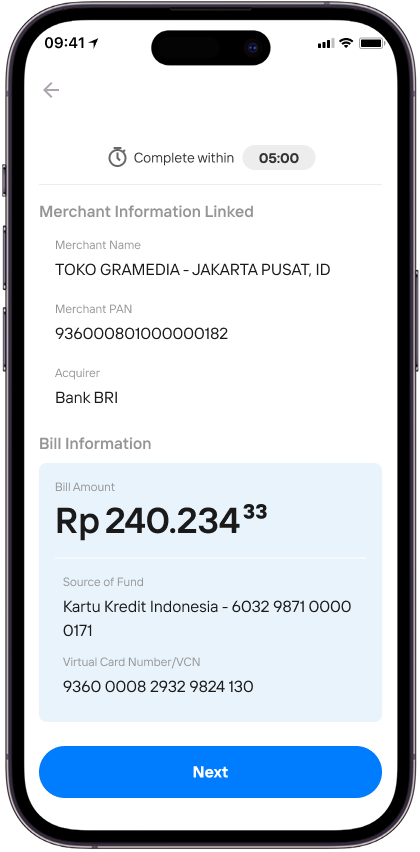
Double-check your transaction details, then tap Continue to complete payment.
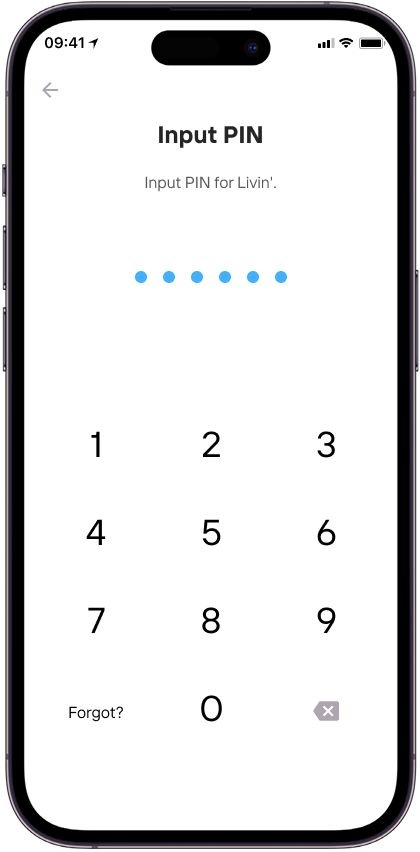
Enter your Livin’ PIN for the verification process.
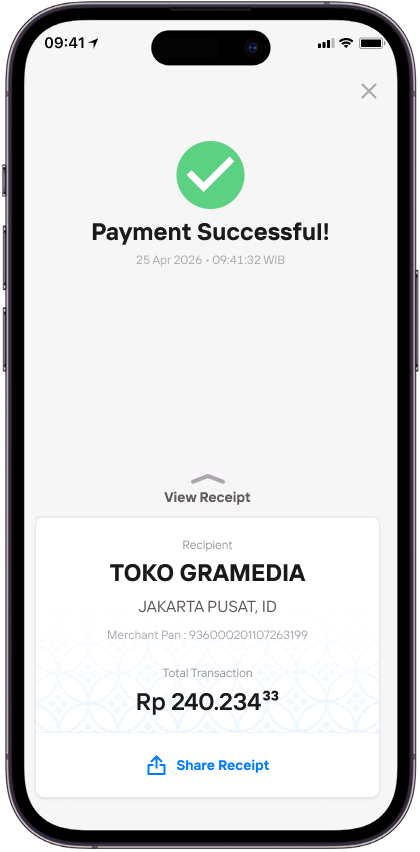
Your payment is successful.
Binding CPTS Payment without Confirmation
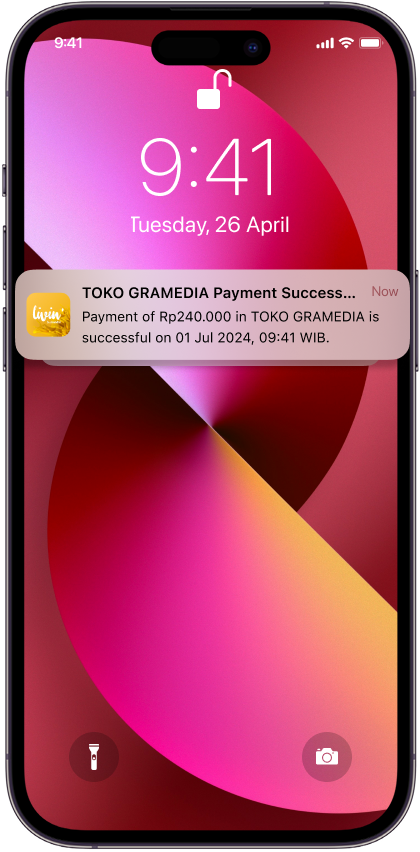
You can make payments directly on e-commerce using the linked online token source of fund.
When you complete a payment on the e-commerce site, you will receive a transaction notification in Livin’.
Request Binding without a Transaction
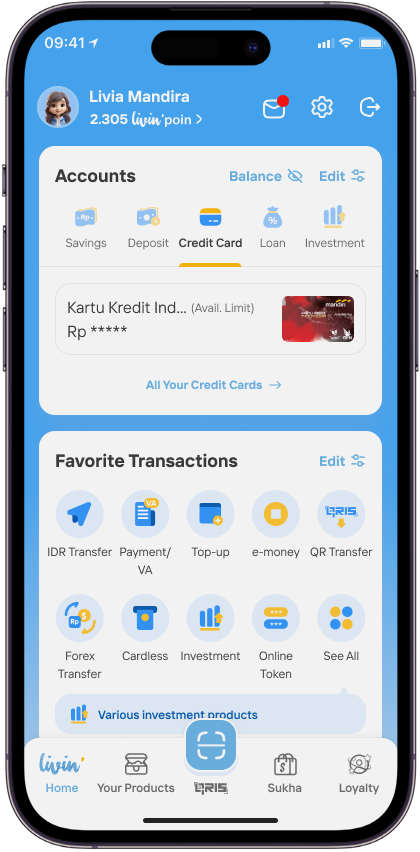
Open the Livin’ app, then select the Token Online menu on the Home page.
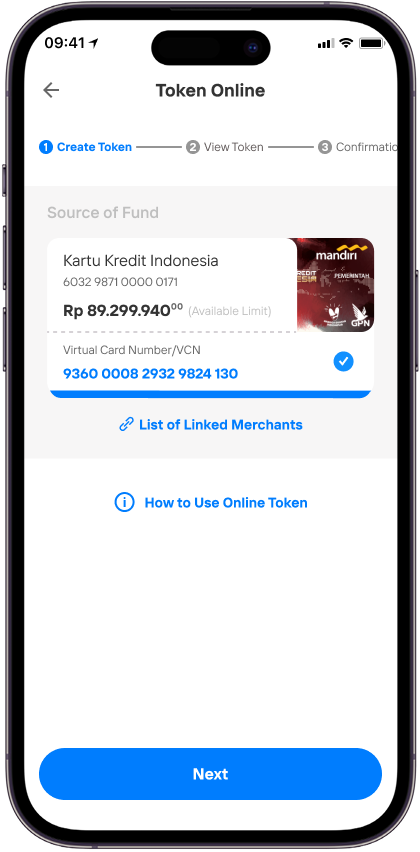
Select the source of funds to be used as the payment method, then click Continue to get your transaction token.
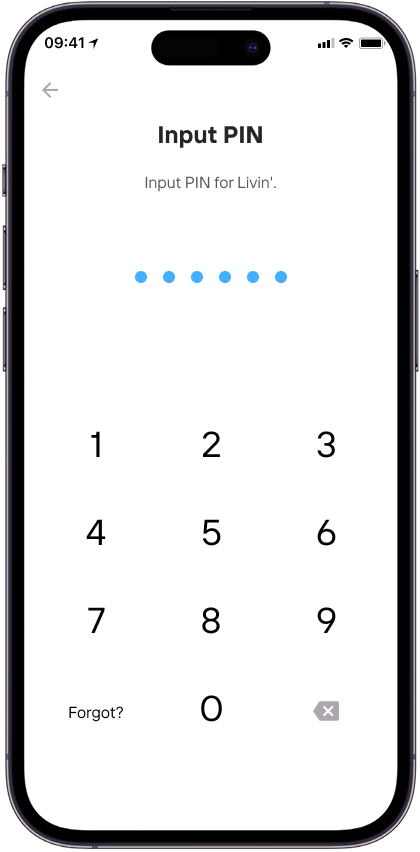
Enter your Livin’ PIN for the verification process.
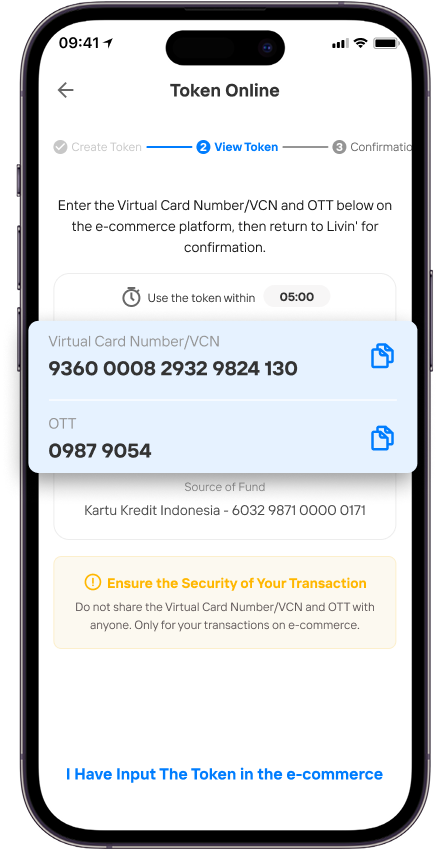
Copy the VCN and OTT codes, then enter or paste them into the payment page of the destination merchant.
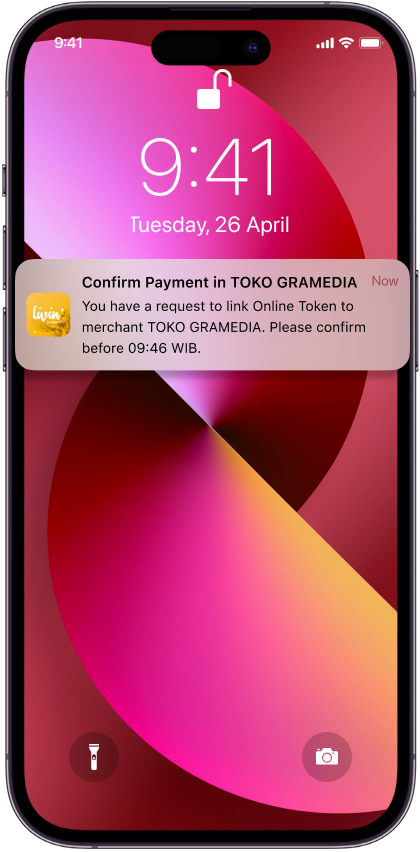
Click the notification to see the payment details in Livin’.
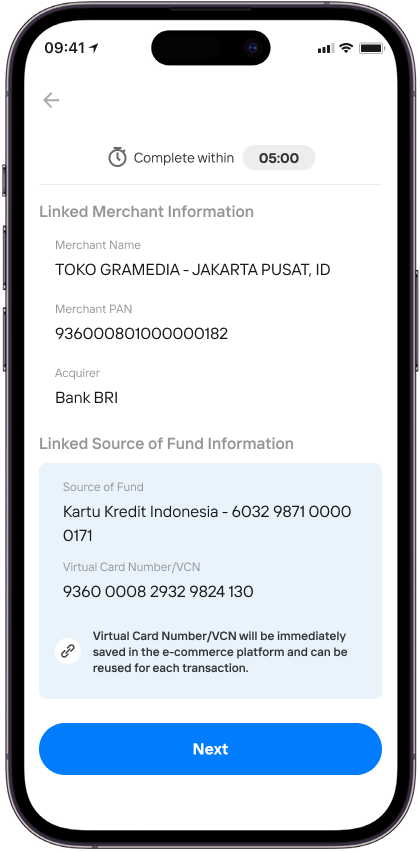
Make sure the merchant name and source of fund is correct, then click Next.
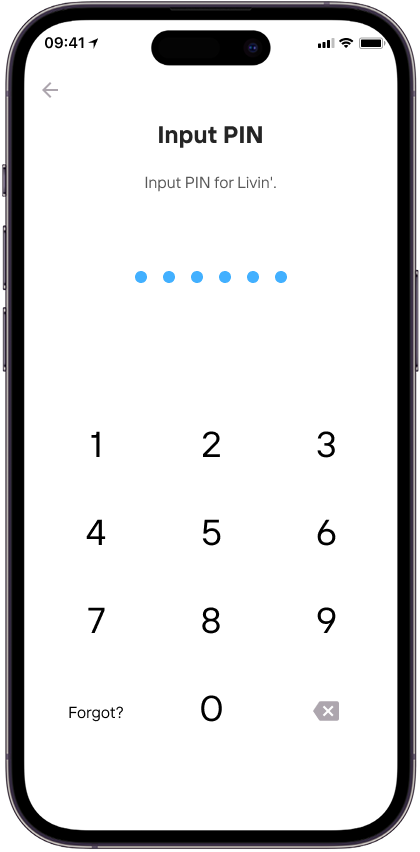
Enter your Livin’ PIN for the verification process.
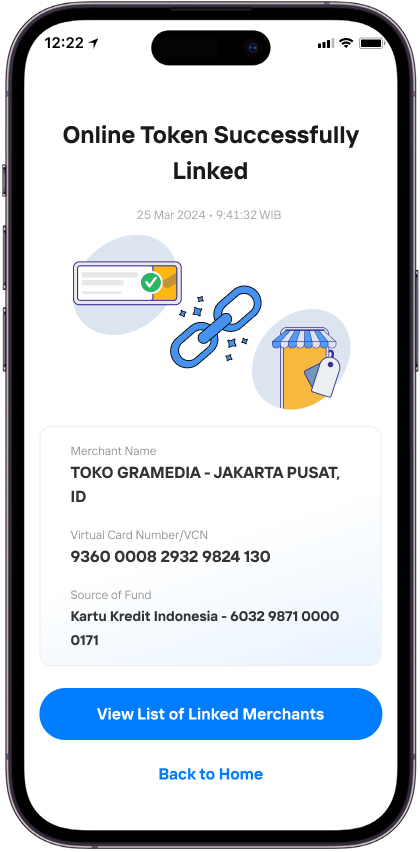
Online Token successfully linked and now your source of fund is linked to the merchant.
Request Unbinding di Livin'
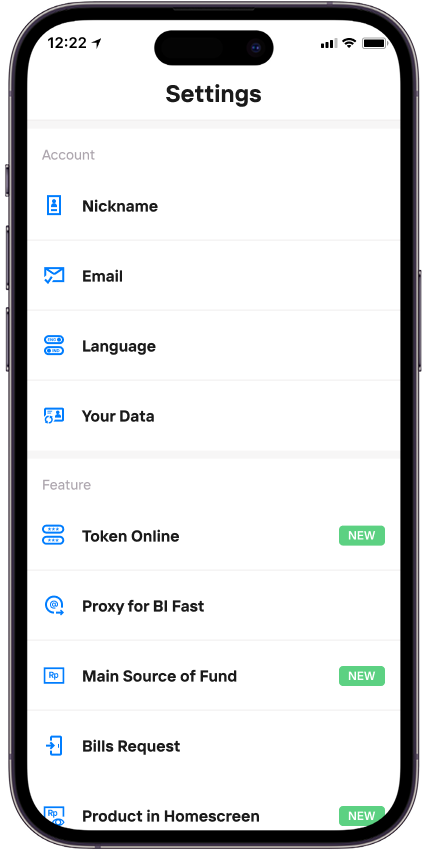
Go to Settings and choose Online Token menu.
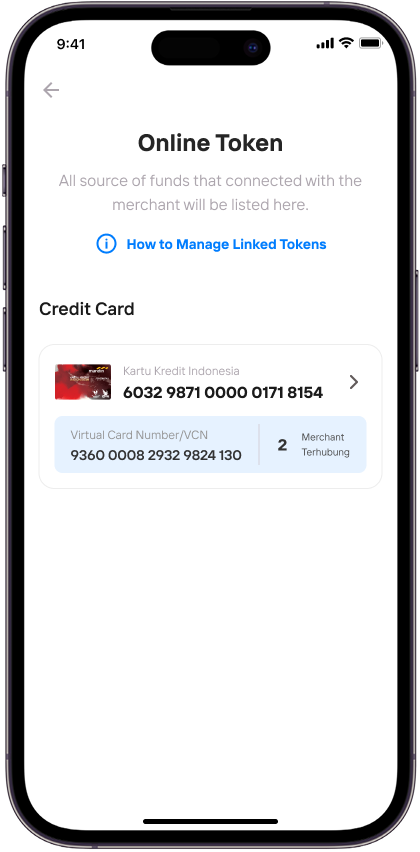
Select the source of fund.
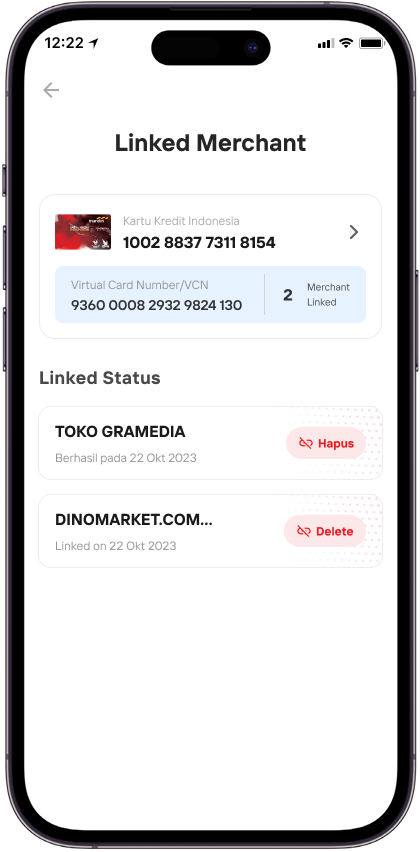
In the linked merchant list, click Delete
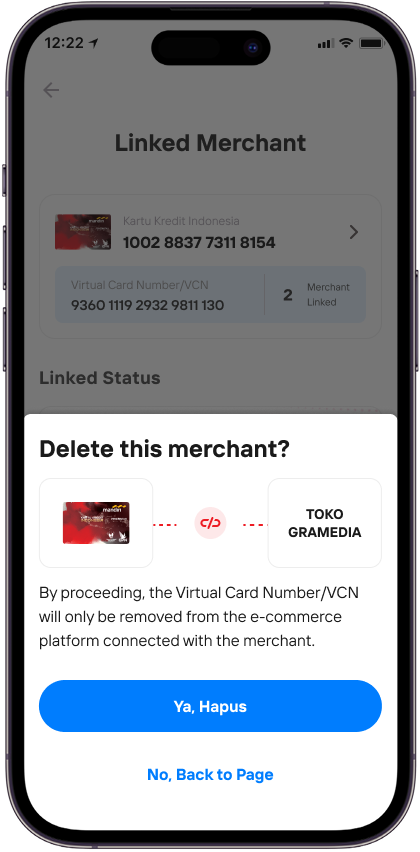
Make sure the merchant name is correct and click “Yes, Delete” to confirm.
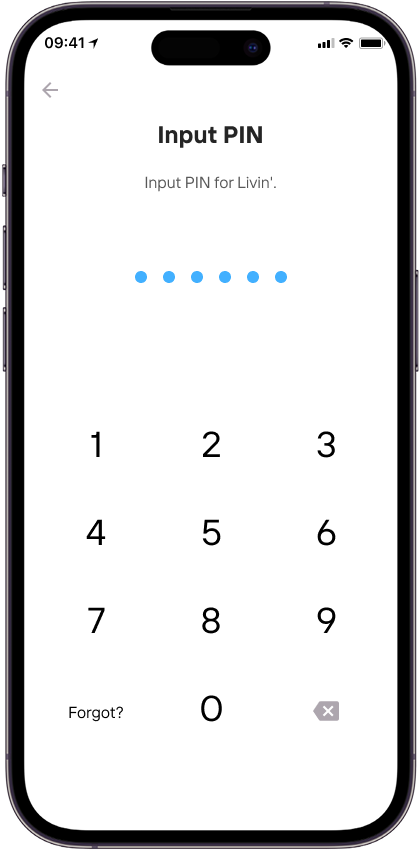
Enter your Livin’ PIN for the verification process.
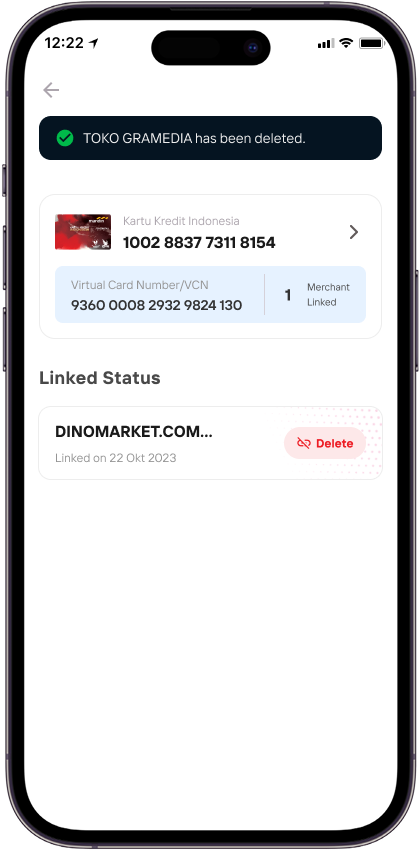
Merchant is successfully deleted from Online Token.
FAQ - CPTS
Frequently Asked Questions
What is the CPTS Online feature?
The Consumer Present Token Secure (CPTS) Online feature is a feature in the Livin' by Mandiri application that allows customers to make transactions at online merchants/e-commerce using a Virtual Card Number (VCN) and One Time Token (OTT) code generated in Livin' by Mandiri.
What are the benefits of using the CPTS Online feature?
The CPTS Online feature offers an online shopping experience using a Virtual Card Number (VCN), so that source of funds information does not need to be shared directly and can enhance online shopping security.
What are VCN and OTT?
Virtual Card Number (VCN) and One Time Token (OTT) are two components used as tokens to make online transaction payments at online merchants/e-commerce.
- VCN is a 19-digit card number used as an identifier for the source of funds used by the customer for online transactions in e-commerce.
- OTT is an 8-digit token code that is only valid for one transaction and will expire once used.
What is the validity period of the Token (VCN and OTT)?
VCN is a unique identifier attached to each source of funds used by the customer, so it has no validity period. Meanwhile, OTT has an active time limit in accordance with the policy determined by the bank. If not used, the OTT will automatically expire and can no longer be used for subsequent transactions.
Can VCN and OTT be used for more than one transaction?
VCN will always be the same for each type of funding source, while the OTT generated by the customer in the CPTS Online menu can only be used for a single online transaction.
What is the difference between CPTS Online and the payment method using a card for online transactions in e-commerce?
In the payment method using a card for online transactions, customers are required to enter their credit card number, expiration date, and CVV so that the card can be connected to the online merchant/e-commerce. Meanwhile, with CPTS Online, users can access the Online Token menu in Livin' by Mandiri to obtain a VCN and OTT that can be used directly for online transactions at online merchants/e-commerce. CPTS Online offers customers secure and efficient transactions by prioritizing data security and tokenization, as well as avoiding the storage of sensitive information on online merchant/e-commerce platforms.
Can all online merchants/e-commerce use CPTS Online payments?
Online merchants/e-commerce that can accept CPTS Online transactions include Dinomarket, Blibli, Toko Gramedia, and other online merchants/e-commerce.
What types of funding sources can be used for CPTS Online transactions?
Funding sources that can be used for CPTS Online transactions are Indonesian Credit Cards and other active funding sources owned by the user and valid in Livin' by Mandiri.
What is the daily transaction limit for CPTS Online that I can perform?
Currently, the CPTS Online transaction limit is Rp10 million/transaction with a total daily limit of Rp10 million.
How to transact using the CPTS Online feature in Livin' by Mandiri?
- On the e-commerce payment page, select the payment method using Indonesian Credit Card.
- Then click "Pay" on the e-commerce site.
- Log in to the Livin' by Mandiri application, select the "Online Token" menu on the main page or the detail page of the card to be used as the source of funds for the CPTS Online transaction.
- Select the source of funds to be used and then click "Continue".
- Enter the EPIN to generate VCN and OTT.
- Copy the generated VCN and OTT codes.
- Return to the e-commerce site, enter the copied VCN and OTT, click "Continue Payment".
- Complete the Livin' by Mandiri payment by confirming the payment, then enter the EPIN.
- Payment is successful and the customer will receive a receipt in Livin'.
How long is the active period to confirm the transaction?
Customers can confirm online transaction payments within the time limit determined by the online merchant/e-commerce. If the customer does not confirm within that time limit, the ongoing transaction will expire and the customer will be asked to repeat the payment process by generating a new token.
Can CPTS Online transactions using Credit Card funds be paid in installments?
Yes, CPTS Online transactions using credit card funds can be paid in installments in accordance with the applicable minimum transaction provisions using a credit card.
Is there a transaction fee for the CPTS Online feature?
Currently, CPTS Online transactions through Livin' by Mandiri are free of charge.
Can I cancel a token that has been generated?
You can cancel an online token through the CPTS Online menu on the View Token page. Click the arrow button in the upper left corner, after which a confirmation will appear and click "Yes, Continue" if you are sure you want to cancel the token and you will be directed back to the token creation page.
Why do I need to confirm the transaction after entering VCN and OTT on the online merchant/e-commerce site?
To maintain the security of customer online transactions, it is necessary to confirm the transaction that has been made to ensure that the customer is indeed making the transaction and authorizing the payment on the e-commerce site, thereby preventing unauthorized transactions or misuse of tokens by unauthorized parties.
Can I cancel the CPTS Online transaction confirmation?
If the customer wishes to cancel the transaction and does not want to continue payment using CPTS Online in Livin' by Mandiri, the customer can do so by clicking "Cancel Payment" or clicking the "back" button in the upper left corner on the confirmation page if they want to repeat the generation of a new token.
Can I delete my Online Token that is connected to a merchant/e-commerce?
If the customer wishes to delete an online token connected to a merchant/e-commerce, the customer can do so through Livin' by Mandiri by entering the Settings menu and selecting the Connected Online Token they wish to delete, or the customer can also delete the connected online token via the delete online token menu on the merchant/e-commerce side.
Why can't I make a CPTS Online transaction?
To be able to transact using CPTS Online in the Livin' by Mandiri application, there are several things that must be ensured:
- Ensure the smartphone you have is connected to a stable internet network and connection. If using a wifi network, ensure the device is connected to wifi. If you are using a cellular network, ensure your data plan is sufficient and the network is stable.
- Ensure you are using a funding source as per point 8 that has an active status.
- Ensure the Balance/Limit of the funding source is sufficient.
- Ensure the online merchant/e-commerce can accept payments using the CPTS Online feature.
Can I request a refund from the merchant?
Yes, you can request a refund from the online merchant/e-commerce.
How long does the refund process take until the funds are returned to my account?
The SLA from complaint submission to the return of funds to the customer is a maximum of 30 working days.
What are the risks of using the CPTS Online feature?
- Data security risk: The risk of the customer providing the VCN and/or OTT code to unauthorized parties.
- Transaction failure risk: The risk of transaction failure if the customer conducts a transaction exceeding the daily limit, has insufficient balance, uses the wrong token, or system failure.
What should I do if I get a payment status of unsuccessful, but my balance is deducted?
- Check the Transaction History in Livin' by Mandiri to see if there is an automatic refund.
- If you have not received an automatic refund by the day after the transaction, send a report to Bank Mandiri's official email (mandiricare@bankmandiri.co.id) or contact Mandiri Call Center 14000.
What should I do if I get a pending payment status?
- Re-check the latest payment status on the online merchant/e-commerce site.
- If the transaction status is unsuccessful or not recorded on the online merchant/e-commerce side, please make the payment again. Keep proof of transaction from the merchant (can be a receipt or screenshot) as supporting data for your report.
- If you have not received a refund the day after the transaction, send a report to Bank Mandiri's official email (mandiricare@bankmandiri.co.id) or contact Mandiri Call Center 14000.
What should be done if the payment is successful in Livin' by Mandiri, but fails or is not recorded on the merchant's side?
- You can submit a dispute for a successful transaction at the merchant through Mandiri Call Center 14000 and/or send a submission letter via email to mandiricare@bankmandiri.co.id.
- Transaction disputes are accepted no later than 30 calendar days after the statement printing date.