



Cara Transfer Valas di Livin' by Mandiri dengan Mudah
Content - Transfer VALAS R17
How to Transfer Forex at Livin' by Mandiri.
Download Now! Discover all the convenience of financial transactions in Livin'. And learn how to use it here.


How to Transfer Forex
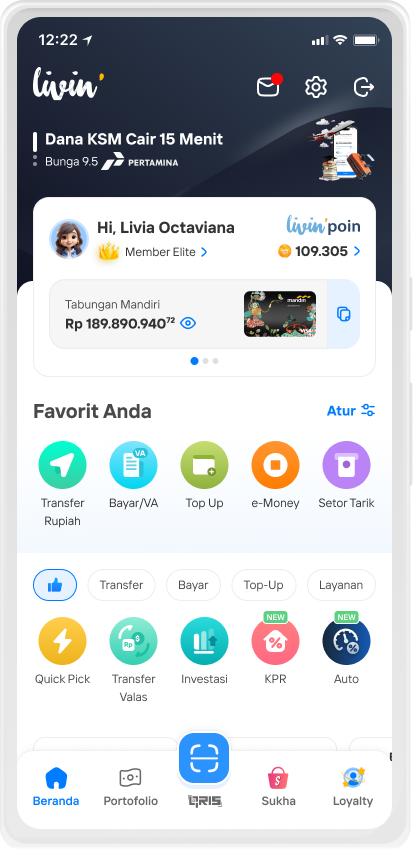
Select Forex Transfer feature
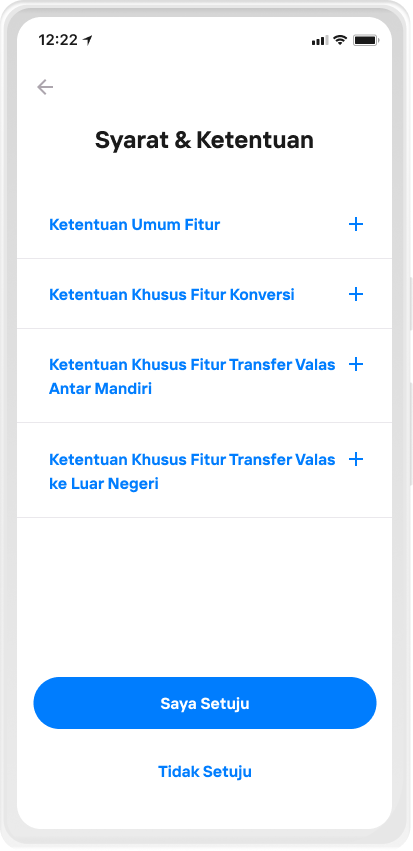
Read the Terms & Conditions, then select I Agree
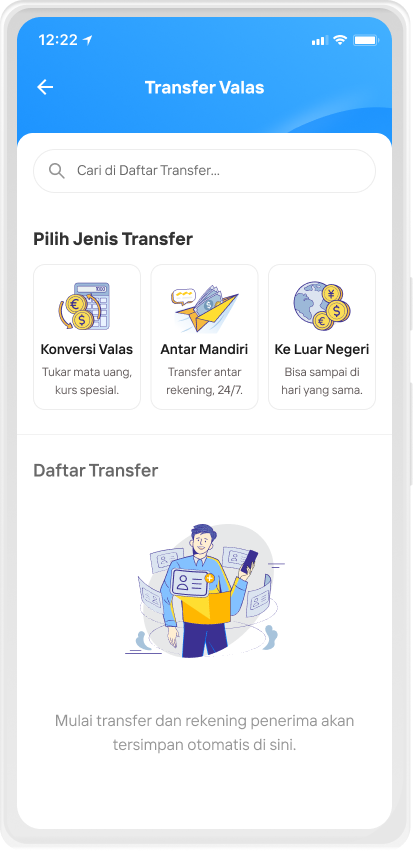
Select Transfer Abroad in the transfer category
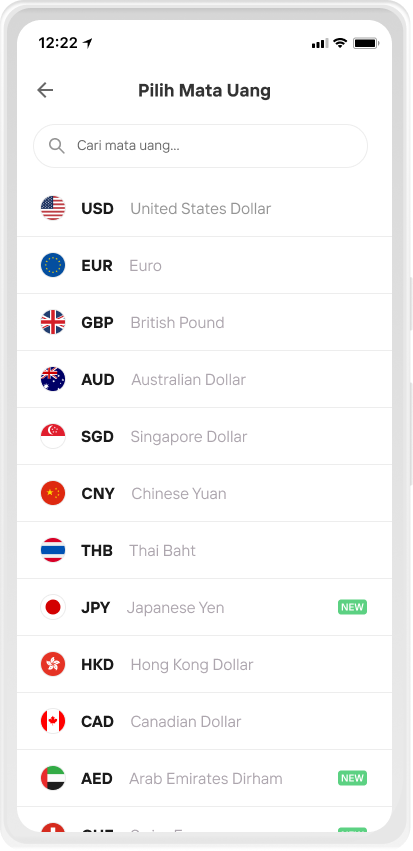
Select the destination Currency
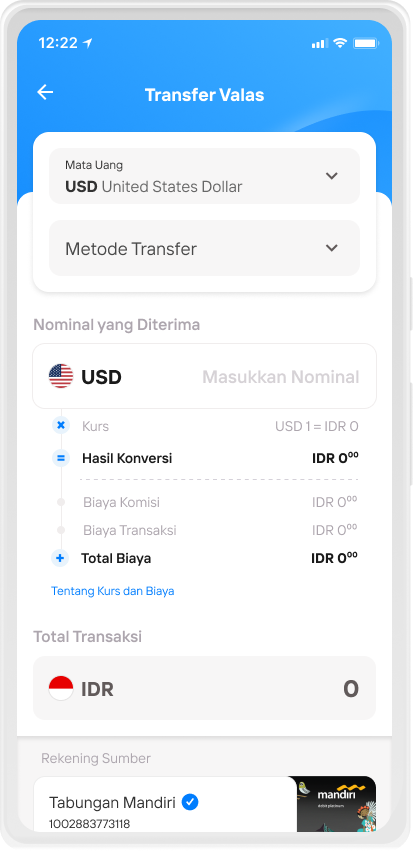
Select the Transfer Method
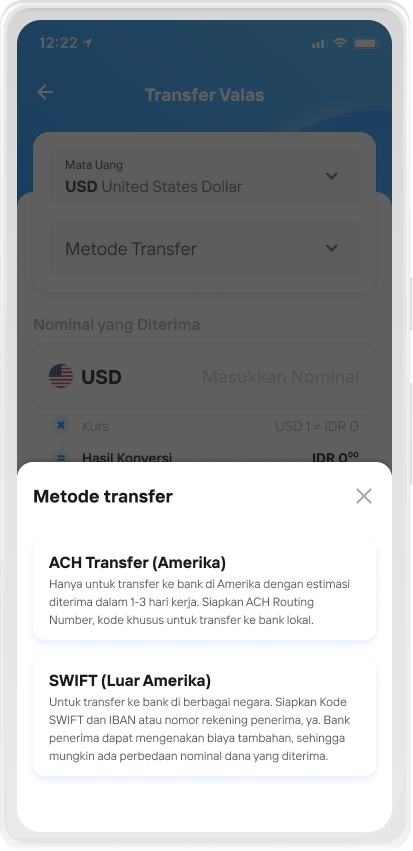
Select the Transfer Method
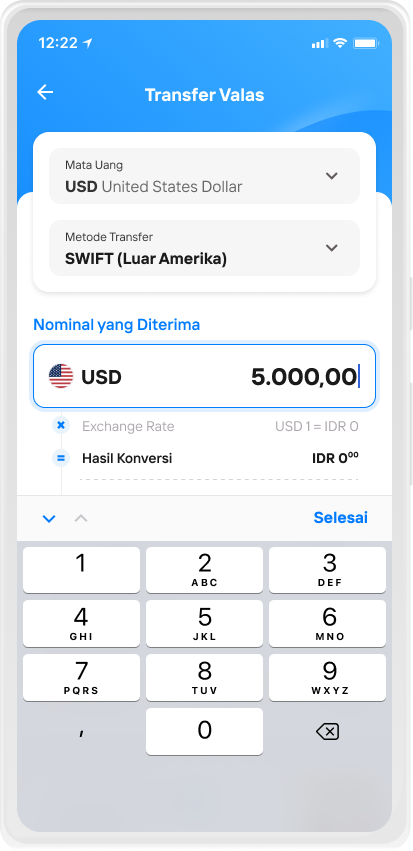
Enter the amount received, then continue
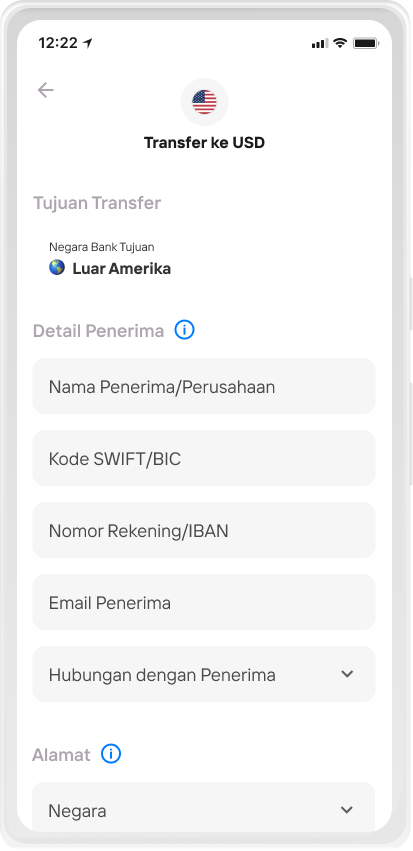
Fill in the recipient details, then continue
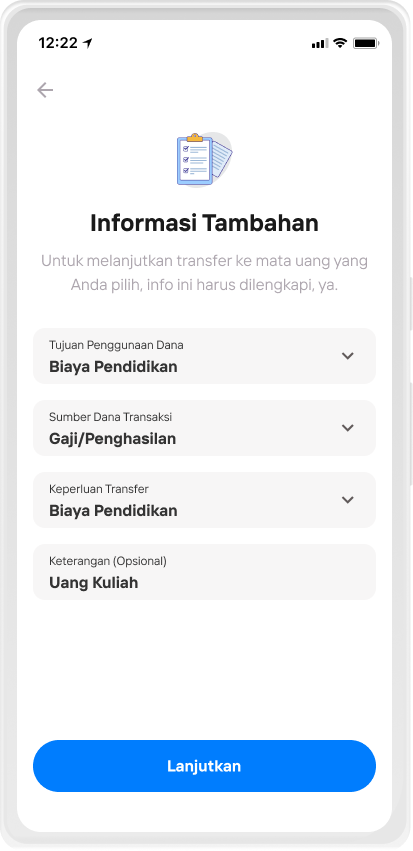
Complete the required additional information
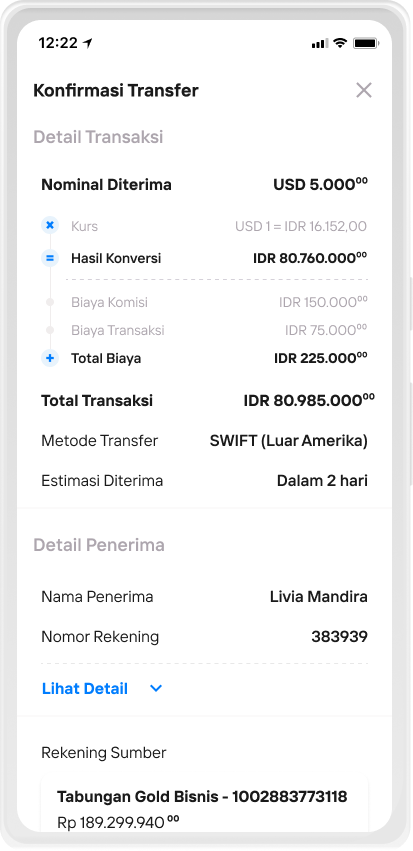
Check and confirm the transfer details, make sure they are correct
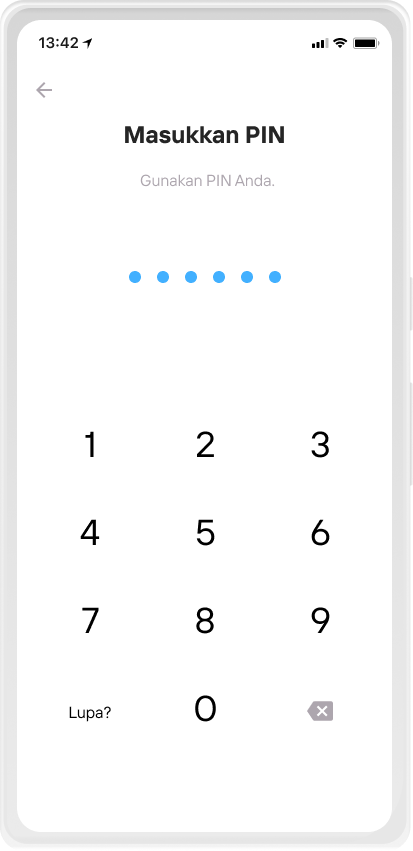
Input Livin' PIN
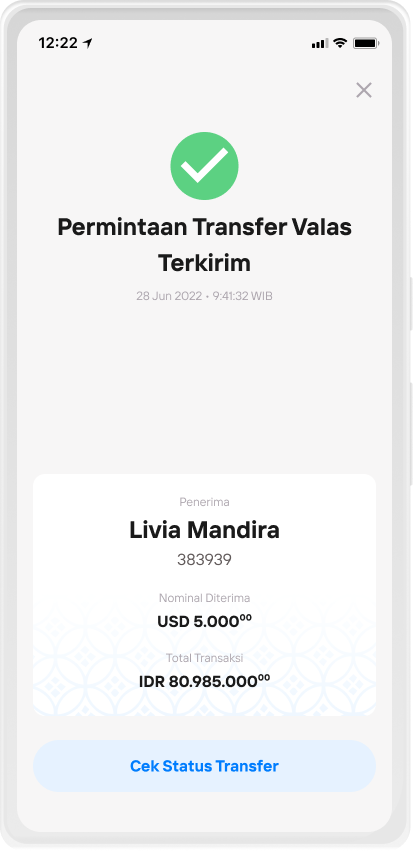
Check transfer status after the transfer request is sent
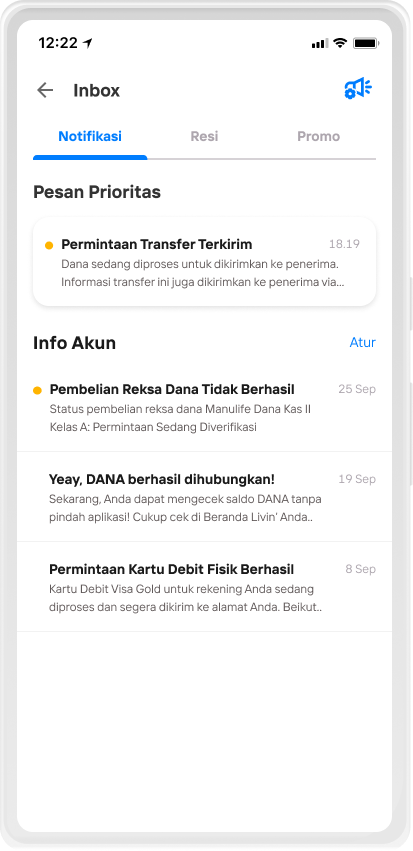
Transfer status can be tracked periodically in the Message menu
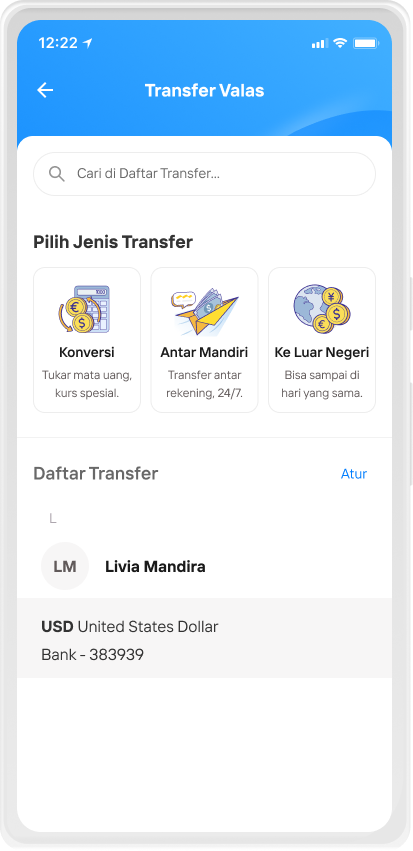
The recipient account is automatically saved in the Transfer List
Risks:
- Risk of non-compliant transactions:
Risk of errors in inputting benefficiary / recipient data, so that funds fail to be sent or sent to the wrong recipient. - Risk of system failure:
Risk of connection disruption or system maintenance causing forex transfer transactions to fail. - Risk of failed transfer:
The risk of failed transfer occurs if the customer makes forex transfer transactions exceeding the daily limit or single transaction limit, or does not have sufficient balance.
FAQ - Transfer VALAS 2026 PART 1 - AED
Frequently Asked Questions (FAQs)
Forex Transfer Abroad feature in Livin’ by Mandiri is a foreign exchange transaction facility for sending funds to overseas banks, which is processed through non-SWIFT transfer methods.
Forex transfer abroad via Livin’ by Mandiri can be conducted 24/7 through the Livin’ by Mandiri application, with funds being forwarded within minutes. The amount received by the beneficiary is not subject to any deductions (full amount guarantee). This full amount guarantee applies to all transactions except Global USD transfers (USD remittances to countries other than the United States). For Global USD transfers, there is a possibility that the receiving bank may deduct additional fees on the beneficiary’s side, in accordance with the receiving bank’s policy.
In contrast, foreign currency transfers via the SWIFT method can only be processed during Bank Mandiri branch operating hours, with the following cost components applied:
-
OUR: fees are borne by the sender
-
BEN: fees are borne by the beneficiary
Customer may conduct transactions from IDR or foreign currencies to 18 destination currencies, covering approximately 180 destination countries, as follows:
-
USD: United States
-
Global USD: Countries outside the United States, as listed in Livin’ by Mandiri
-
GBP: United Kingdom
-
EUR: Austria, Belgium, the Netherlands, Cyprus, Estonia, Finland, France, Germany, Greece, Ireland, Italy, Latvia, Lithuania, Luxembourg, Malta, Monaco, Portugal, Slovakia, Slovenia, Spain
-
SGD: Singapore
-
AUD: Australia
-
CAD (Interac and Local Bank)*: Canada
-
HKD: Hong Kong
-
INR (UPI ID and Local Bank)*: India
-
THB: Thailand
-
CNY: China
-
JPY: Japan
-
AED: United Arab Emirates
-
CHF: Switzerland
-
KRW: South Korea
-
MYR (DuitNow and Local Bank)*: Malaysia
-
PHP: Philippines
-
VND: Vietnam
-
NZD: New Zealand
*Certain destination currencies support more than one transfer method. Each transfer method has different fees and delivery SLAs. Customers may select their preferred transfer method in the Livin’ by Mandiri application according to their needs.
There are two cost components borne by the customer, namely:
- Commission Fee
A fee from the exchange rate margin, which may vary depending on the transaction amount and timing, as well as service fees for forwarding international fund transfers. - Transaction Fee
A fixed fee charged for each transaction. The transaction fee is IDR 75,000 (seventy-five thousand rupiah) or equivalent to USD 5 (five US dollars).
Currently, there is an ongoing promotion for transaction fees in Livin’ by Mandiri, with discounts starting from IDR 40,000 (forty thousand rupiah), varying based on the currency of the source account used. Transaction fees are more affordable when a Multicurrency Savings Account is used as the source account.
Details of the transaction fees charged for each source account currency during this promotional period can be found on the bmri.id/promotfvalas page.
Yes. The exchange rate used for transactions in Livin’ by Mandiri is the latest rate and is more competitive.
No. The Forex Transfer Abroad feature in Livin’ by Mandiri is available to customers for sending funds to overseas banks 24/7, with no transaction operating hour limitations.
Funds from Forex Transfer Abroad transactions in Livin’ by Mandiri may be forwarded to the beneficiary within minutes, hours, or on a same-day basis, depending on the selected destination currency and the transaction cut-off time in the beneficiary’s country.
Yes. The Forex Transfer Abroad feature in Livin’ by Mandiri is transparent and displays the estimated fund forwarding time on the main Foreign Currency Transfer screen after the sender inputs the transaction amount.
All Livin’ by Mandiri customers who hold individual retail savings or current accounts in the following 17 currencies:
- IDR
- USD
- EUR
- SGD
- AUD
- GBP
- HKD
- CNY
- JPY
- CHF
- THB
- MYR
- SAR
- CAD
- NZD
- KRW
- AED
The Forex Transfer Abroad in Livin’ by Mandiri can be used by customers to send funds to overseas bank accounts or e-wallet destinations.
Currently, Forex Transfer Abroad using non-SWIFT methods are only available through the Livin’ by Mandiri channel. Meanwhile, foreign currency transaction services at Bank Mandiri branches are available to customers via the SWIFT method.
Customers who wish to conduct ForexTransfer Abroad using currencies other than the 18 supported destination currencies (USD & Global USD, GBP, EUR, SGD, AUD, CAD, HKD, INR, THB, CNY, JPY, AED, CHF, KRW, MYR, PHP, VND, and NZD) may visit the nearest Bank Mandiri branch and perform foreign currency transfers using the SWIFT method.
Forex transfer to other Bank Mandiri accounts can be conducted through the Foreign Currency Transfer menu under the Intra-Mandiri sub-menu, with 15 destination currencies, as follows:
- USD
- EUR
- SGD
- AUD
- GBP
- HKD
- CNY
- JPY
- CHF
- THB
- MYR
- SAR
- CAD
- NZD
- KRW
Meanwhile, Forex Transfer services in Livin’ by Mandiri to other banks in Indonesia currently only support USD transactions using the Global USD service.
Currently, non-local destination currencies are only supported for USD transfers using the Global USD service.
Yes, the following transaction limits apply:
- Minimum transaction limits:
a. USD transfers: minimum USD 20
b. Transfers in currencies other than point a: minimum USD 5 equivalent - Maximum limit per transaction:
• USD, EUR, SGD, GBP, AUD, HKD, AED, CHF, NZD, PHP, or other currencies as may be determined by Bank Mandiri in the future: USD 25,000 or Equivalent to the beneficiary currencies
• THB = THB 200.000
• INR = INR 200.000
• CAD = CAD 10.000
• CNY = CNY 50.000
• JPY = JPY 1.000.000
• KRW = KRW 5.000.000
• VND = VND 490.000.000 - Maximum monthly transaction limit: USD 10,000 equivalent on a cumulative basis per customer (for transactions funded from IDR source accounts).
FAQ - Transfer VALAS 2026 PART 2
Customers may conduct forex transfer transactions at a Bank Mandiri branch by presenting the required underlying documents supporting the transaction purpose.
Currently, the Forex Transfer Abroad in Livin’ by Mandiri can only be used for monthly transaction amounts below USD 10,000 equivalent without underlying documents. Transactions exceeding USD 10,000 equivalent that require underlying documents can only be processed via the SWIFT method at the nearest Bank Mandiri branch.
Yes. Customers can track the status of their Forex Transfer Abroad in Livin’ by Mandiri through the following steps:
-
Click the Inbox or Messages menu in Livin’ by Mandiri.
-
Select the relevant Forex Transfer transaction details
In addition, customers will receive push notifications when there is a change in transaction status, whether successful or unsuccessful.
-
Transfer Request Sent: Funds have been debited from the sender’s account and will be forwarded to the beneficiary.
-
Foreign Currency Transfer Successfully Processed: Funds have reached the destination bank and are being forwarded to the beneficiary’s account.
-
Foreign Currency Transfer Unsuccessful: The transaction could not be processed due to (a) discrepancies in beneficiary details, (b) the beneficiary’s account being inactive, or (c) the customer being identified on sanction screening lists in Indonesia or the destination country.
Yes. Customer funds will be refunded to the source account under the following conditions:
-
Customer funds will be returned using the exchange rate applicable on the refund date, with a refund SLA of no later than 7 business days.
-
If either the sender or the beneficiary is identified during Anti-Money Laundering and Counter-Terrorism Financing (AML/CTF) checks and/or sanction list screening, the Bank reserves the right to cancel the transaction or request additional supporting documents from the sending customer for submission to the relevant authorities.
Yes. The beneficiary may be notified of the incoming funds from Bank Mandiri via the email address input by the sending customer during the Forex Transfer Abroad transaction process in Livin’ by Mandiri.
Yes. The beneficiary detail requirements for each destination currency in Forex Transfer Abroad transactions in Livin’ by Mandiri are dynamic and vary according to the transfer regulations of each destination country’s local currency.
-
Beneficiary type (Business/Individual)
-
Beneficiary name
-
ACH Routing Number (9-digit bank account identifier for recipient banks in the United States)
-
Account type (Current/Savings)
-
Account number
-
Beneficiary address (destination country, city, postal code, building/house number)
-
Beneficiary email
- Jenis penerima (Bisnis/Perorangan)
- Nama penerima
- SWIFT Code/BIC Bank Penerima
- Jenis rekening (Giro/Tabungan)
- Nomor rekening atau IBAN Penerima
- Alamat penerima (negara tujuan, kota, kode pos)
- Email penerima
- Jenis penerima (Bisnis/Perorangan)
- Beneficiary type (Business/Individual)
- Beneficiary name
- UK Sort Code (6-digit bank account identifier for recipient banks in the United Kingdom)
- Account number
- Beneficiary email
- Beneficiary email
- Beneficiary type (Business/Individual)
- Beneficiary name
- IBAN (up to 34-digit bank account identifier for recipient banks in European Union countries)
- Account number
- Beneficiary email
- Beneficiary type (Business/Individual)
- Beneficiary name
- Bank name
- Account number
- Beneficiary email
- Beneficiary type (Business/Individual)
- Beneficiary name
- BSB Code (6-digit number consisting of bank, state, and branch identifiers in Australia)
- Account number
- Beneficiary address (country, city, destination address)
- Beneficiary email
- Beneficiary type (Business/Individual)
- Beneficiary name
- Account type (Current/Savings)
- Beneficiary email or mobile phone number
- Interac security question and answer
- Account number
- Beneficiary address (country, city, destination address, building number)
- Beneficiary email
- Beneficiary type (Business/Individual)
- Beneficiary name
- Institution Number
- Transit Number
- Account type (Checking/Savings)
- Account number
- Beneficiary email
- Beneficiary address (country, city, destination address)
- Beneficiary type (Business/Individual)
- Beneficiary name
- Account type (Current/Savings)
- Bank name (picklist)
- Account number
- Beneficiary email
- Beneficiary type (Business/Individual)
- Beneficiary name
- IFSC Routing Code (11-digit code consisting of bank and branch identifiers in India)
- Bank name (picklist)
- Account number
- Beneficiary email
*In accordance with regulations in India, the beneficiary name must consist of both a first name and a last name. If the beneficiary has only one name, the same name must be entered as both the first and last name.
Example:
If the beneficiary’s name is “Livia”, input “Livia Livia”.
If the beneficiary’s first or last name consists of only one letter, for example “Livia M”, input “Livia LiviaM”.
- Beneficiary type (Business/Individual)
- Beneficiary name
- UPI ID
- Beneficiary email
- Beneficiary address (country, destination address, city, postal code)
FAQ - Transfer VALAS 2026 PART 3
- Beneficiary type (Business/Individual)
- Beneficiary name
- Thailand Bank Code (3-digit code representing banks in Thailand)
- Account number
- Beneficiary email
- Beneficiary type (Business/Individual)
- Beneficiary name
- Alipay ID
- Beneficiary email
- Beneficiary address (country, destination address, city, postal code)
In accordance with regulations issued by authorities in China, beneficiaries of cross-border Alipay China transactions must be Chinese citizen. If the Alipay ID belongs to a non-Chinese citizen, the transaction will not be successful.
Under certain conditions, Alipay may also request additional information from the beneficiary via SMS or notifications in the Alipay application. Such requests must be responded to within a maximum of 72 hours from the time the request is sent; otherwise, the transaction may not be forwarded to the beneficiary’s Alipay ID
- Beneficiary type (Business/Individual)
- Beneficiary name (Katakana/Latin. Please ensure the name and script used match the records at the beneficiary’s bank account)*
- Bank name***
- Account type (Savings 普通 Futsuu / Time Deposit 貯蓄 Chochiku / Checking 当座 Touza)
- Account number**
- Beneficiary email
- Beneficiary address (country, destination address, city, postal code)
-
* Most beneficiary names on Japanese bank accounts are written in Katakana. Please confirm with the beneficiary that the entered name, including the order of first, middle, and last names, matches the bank’s records.
** For Japan Post Bank or Yucho Bank (ゆうちょ銀行), the beneficiary account number may consist of 8 digits. Currently, only 7 digits can be entered; therefore, customers do not need to input the last digit. Please ensure the 7 entered digits are correct by checking the official Japan Post Bank reference page for account number conversion.
*** For Japan Post Bank or Yucho Bank (ゆうちょ銀行), each customer has a unique 5-digit code called Kigo (記号), which is not the branch code. To determine the branch code, use the 2nd and 3rd digits of the Kigo and add the number “8”.
Example: if the beneficiary’s Kigo is 12345, the branch code is 238.
- Beneficiary type (Business/Individual)
- Beneficiary name
- IBAN (up to 34-digit bank account identifier)
- Beneficiary email
- Beneficiary address (country, destination address, city, postal code)
- Destination bank country (Liechtenstein/Switzerland)
- Beneficiary type (Business/Individual)
- Beneficiary name
- IBAN (up to 34-digit bank account identifier)
- Beneficiary email
- Beneficiary address (country, destination address, city, postal code)
- Beneficiary name
- Date of birth (for individual beneficiaries only)
- Bank name
- Account number
- Beneficiary mobile phone number
- Beneficiary email
- Beneficiary address (country, destination address, city, postal code)
- Beneficiary type
- Beneficiary name
- Bank name
- Account number
- Beneficiary email
- Beneficiary address (country, destination address, city, postal code)
- Beneficiary type
- Beneficiary name
- DuitNow ID
- Account identifier type (Police Number / Business Registration Number / Mobile Number / NRIC)
- Beneficiary email
- Beneficiary address (country, destination address, city, postal code)
- Beneficiary type
- Beneficiary name
- Bank name
- Account number*
- Beneficiary email
- Beneficiary address (country, destination address, city, postal code)
- Beneficiary type
- Beneficiary name
- Bank name
- Account number*
- Beneficiary email
- Beneficiary address (country, destination address, city, postal code)
-
-
*Please ensure that the beneficiary account number entered is correct. Errors in beneficiary account details may result in a refund with an SLA ranging from 2 business days up to 3 months.
- Beneficiary type
- Beneficiary name
- Bank name
- Account number*
- Beneficiary email
- Beneficiary address (country, destination address, city, postal code)
-
*Please ensure that the beneficiary account number entered is correct. Errors in beneficiary account details may result in a refund with an SLA ranging from 2 business days up to 3 months.
For the Purpose of Funds field, the following options are available: Personal, Family, Education, Training, Goods, Travel, Property, Service, Loan, Investment, Medical, and Other. Customers may select the option that best corresponds to the purpose of the funds being sent. There are also certain currency-specific fields that may be required and can be completed based on the transfer needs.
Yes. There are specific local government regulations applicable to CAD transfers. Under Canadian local regulations, the beneficiary must correctly answer the security question using the security answer entered by the sending customer. If the beneficiary fails to answer the security question correctly, or does not respond within 30 days, the transaction will be automatically cancelled and a refund process will be initiated in accordance with the applicable Service Level Agreement (SLA).
The beneficiary’s name should be entered in accordance with the name registered on the bank account. If the beneficiary’s name consists of only one word, the sender may re-enter the same name as the last name.
If customers encounter an issue where the source account does not appear, they should first ensure that the source account is in active status.
If customers experience an issue where the “Save to List” button does not appear, this is because:
- Beneficiary data will be automatically saved to the Saved List after a successful overseas Forex Transfer Abroad transaction.
- The beneficiary details entered by the customer will be stored and automatically pre-filled when the customer performs another transaction by selecting the beneficiary from the Saved List.
- If a customer performs Forex Transfer Abroad transactions to the same beneficiary name but with different destination accounts, the Saved List will display multiple accounts under the same beneficiary name.
Customers must re-verify (provisioning) and reset their transaction PIN in order to resume transactions.
The terms and conditions for Overseas Forex Transfer Abroad via Livin’ by Mandiri can be accessed through the following link: https://bmri.id/livintncvalasln
Di mana pun, kapan pun, apa pun device kamu,
Download Aplikasi Livin’ by Mandiri
Dan dapatkan kemudahan dalam segala urusan finansial sekarang